
When teams first consider an On-call platform, PagerDuty is often the first name that comes to mind.
That is understandable. PagerDuty is one of the most recognizable products in this category, especially in overseas markets. Many SRE, DevOps, and cloud-native teams know it. Its value is clear: when production systems fail, send alerts to the right people and help close the incident response loop.
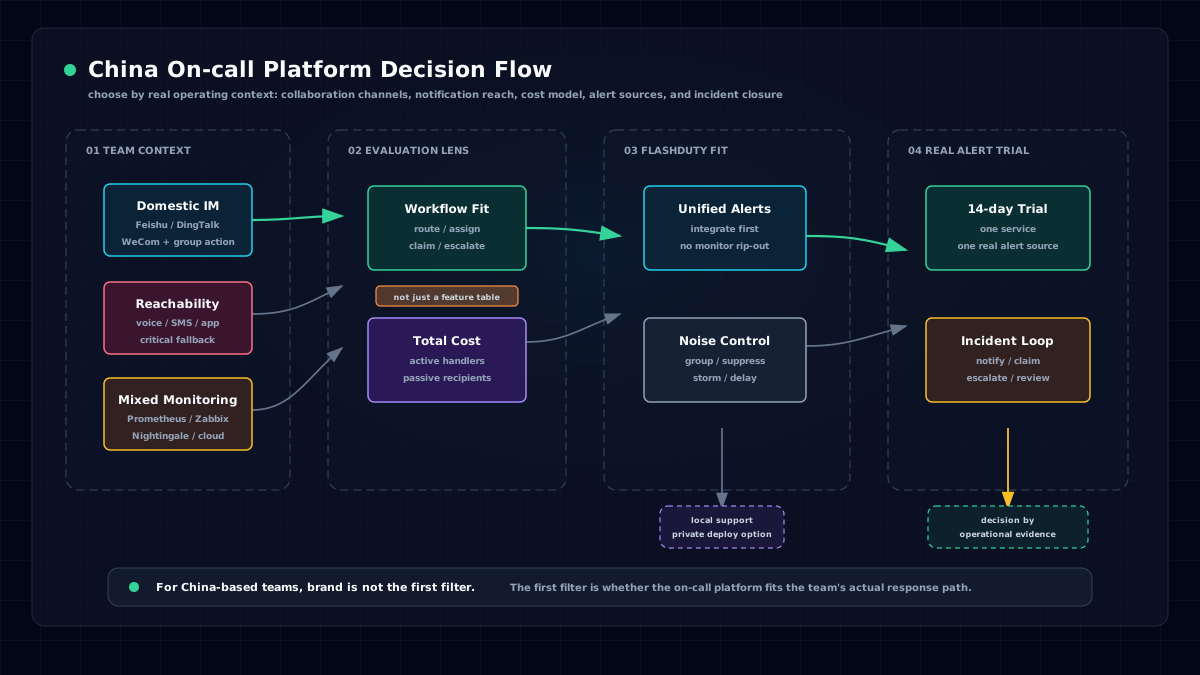
But if your team is mainly based in China, uses Feishu, DingTalk, or WeCom for collaboration, relies on domestic phone and SMS delivery, and runs a mix of Prometheus, Zabbix, cloud monitoring, Nightingale, BlueKing, or internal platforms, you cannot choose an On-call tool by brand recognition alone.
The better question is whether the tool fits how your team actually works.
That is the most important lens for comparing Flashduty and PagerDuty.
Do Not Treat On-call as Just Alert Notification
Many teams initially underestimate the value of an On-call platform.
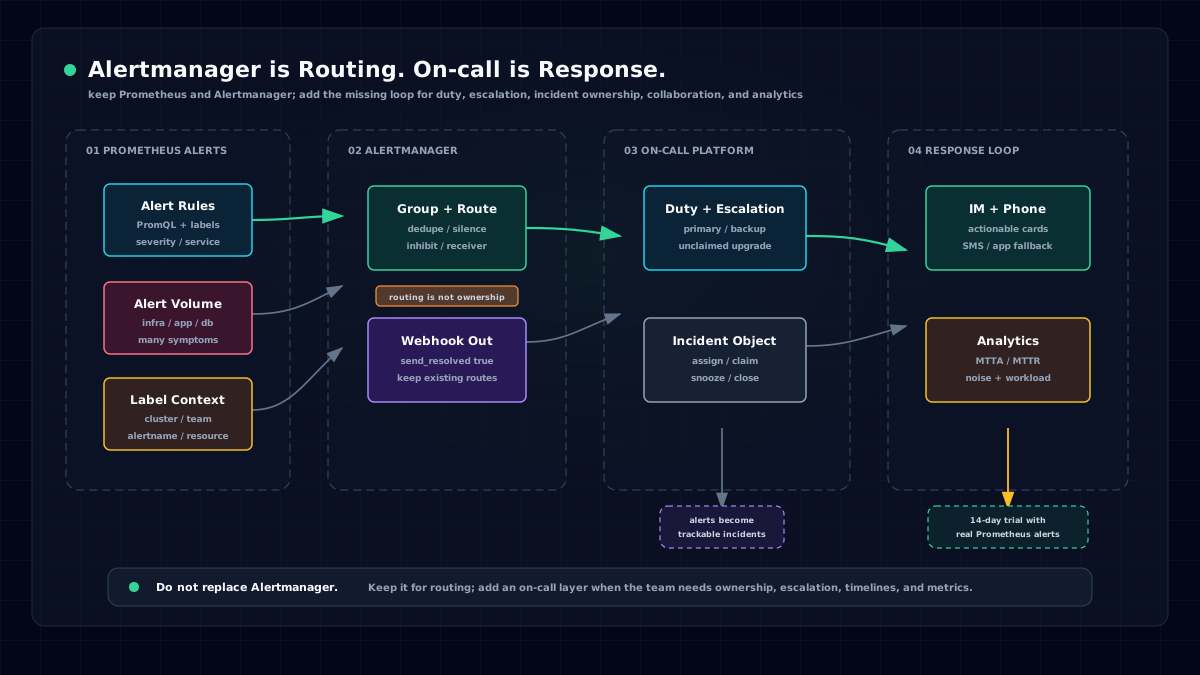
They already have notifications. Zabbix can send email. Prometheus Alertmanager can send Webhooks. Cloud monitoring can send SMS. Feishu and DingTalk bots can push messages to groups. Why buy a separate On-call platform?
Because notification is only the first step.
During a real production incident, the team needs a complete workflow:
Are these alerts duplicated?
Who should be notified?
Who is on call?
What happens if nobody responds?
Has this incident been acknowledged?
Is there a timeline?
Can the team review it afterward?
Can leaders see MTTA, MTTR, compression rate, and responder load?
If these questions rely on group messages, scripts, and manual conventions, the system may survive when the team is small. It will break down as the organization grows.
The essence of an On-call platform is not "sending alerts." It is building an incident response mechanism.
What PagerDuty Is Good For
PagerDuty's strengths are clear.
It is an international product with a mature ecosystem and strong overseas recognition. Its public pages emphasize many out-of-the-box integrations. Its pricing page lists Free, Professional, Business, and Enterprise plans. It supports On-call schedules, escalation policies, Slack, Microsoft Teams, external status pages, Post-Incident Reviews, and other capabilities.
If your team is global, uses Slack and Microsoft Teams as the main collaboration tools, is comfortable purchasing overseas SaaS, budgets in USD, and focuses on international on-call coverage, PagerDuty is a natural option.
But if your team mainly works in China, the practical questions change:
Does the platform integrate deeply with Feishu, DingTalk, and WeCom?
Are voice calls and SMS stable through domestic channels?
Does every notification recipient in a large team need to be paid for?
Can Zabbix, Prometheus, Nightingale, cloud monitoring, and internal systems be integrated at low cost?
Is private deployment available when needed?
Is local support available when configuration or troubleshooting becomes complex?
These questions usually affect rollout more than brand awareness.
Difference 1: Better Fit for Local Collaboration
Flashduty documentation lists multiple notification channels: App push, voice, SMS, email, IM app integrations, and bot integrations.
The key part is IM.
In China-based teams, incident collaboration often happens in Feishu, DingTalk, or WeCom. Flashduty supports Feishu, DingTalk, WeCom, Slack, Microsoft Teams, and other IM integrations. Through app integrations, responders can acknowledge, close, and escalate incidents directly in IM message cards, instead of only receiving a link.
That matters because many incidents are not solved by one on-call engineer alone. They often require developers, operations, DBAs, network engineers, security, and business owners to look together. If the message is only pushed into a group, it quickly scrolls away. If acknowledgement, escalation, and collaboration happen inside IM, the response path is much shorter.
Flashduty also supports voice calls, SMS, and App push. iOS supports Apple Critical Alerts for urgent notifications, and Android supports system-level push channels from mainstream vendors. Voice and SMS can provide a fallback for major incidents or when IM is unavailable.
This is not a nice-to-have. The worst failure mode for On-call tooling is "it looked like it could notify people, but did not reach them when it mattered."
Difference 2: A License Model That Works Better for Large Teams
Flashduty and PagerDuty differ significantly in pricing model.
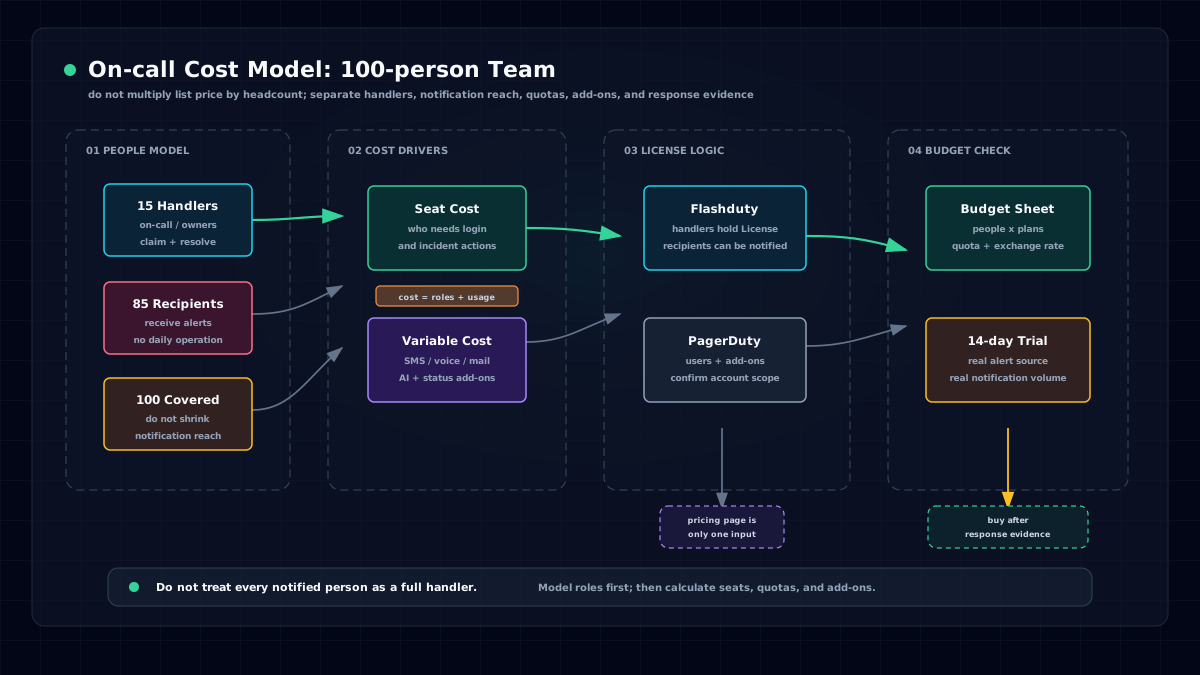
Flashduty On-call uses a license subscription model based on active users. Only people who need to log in, view incident details, acknowledge, and handle incidents need licenses. People who only passively receive alert notifications can be unlicensed.
This is important for large teams.
In a 100-person engineering organization, only 10 to 20 people may regularly participate in schedules and incident response. But when an incident happens, many more developers, business owners, external partners, or managers may need to be notified.
If every notification recipient requires a paid seat, the team faces an awkward choice: pay much more, or limit notification coverage to save money.
Both outcomes are bad.
Flashduty separates incident-handling permission from notification coverage. Licensed members can view and handle incidents; unlicensed members can passively receive email, SMS, phone, and IM notifications, and can also be referenced as notification targets in dispatch policies.
Large teams can cover more people while paying only for core responders.
For a small team, this difference may be less visible. For organizations with multiple business lines, development teams, and collaborating departments, it directly affects total cost of ownership.
Difference 3: Integrate Existing Monitoring First
Many Chinese enterprises do not have a single monitoring stack.
They may have started with Zabbix, added Prometheus and Grafana later, adopted cloud monitoring for some business units, and still run BlueKing, Open-Falcon, Nightingale, SkyWalking, or internal platforms in other places.
If the first proposal is "replace the monitoring system," resistance will be high.
Flashduty is better introduced differently: keep existing monitoring, and unify alert response first.
Flashduty supports many alert sources, including Prometheus, Zabbix, Nightingale, Grafana, AWS CloudWatch, Azure Monitor, Alibaba Cloud, Tencent Cloud, Huawei Cloud, BlueKing, Open-Falcon, Sentry, SkyWalking, standard alert payloads, and Webhooks.
That lets the team do one specific thing first: bring scattered alerts into one response layer, then route, reduce noise, dispatch, escalate, and analyze them consistently.
That is much easier than rebuilding the monitoring stack.
Difference 4: Noise Reduction Must Match Real Scenarios
For many teams, the problem is not "we don't know something broke." It is "we know too much."
One server issue can trigger CPU, memory, disk, process, API, and business-metric alerts. A network flap can repeatedly trigger and recover. A midnight batch of alerts can create waves of phone calls and SMS messages.
The result is not faster response. It is loss of trust in alerts.
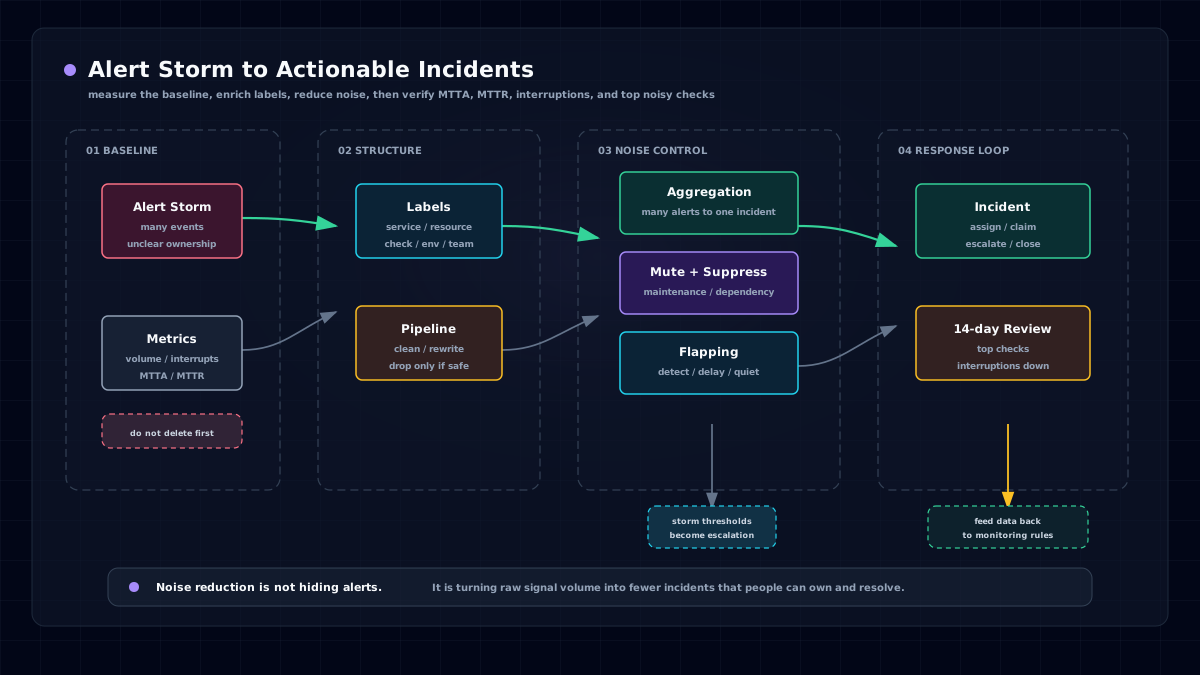
Flashduty puts noise reduction at the center: alert grouping, rule-based grouping, intelligent grouping, silences, suppression, flapping detection, delayed notification, and storm warnings.
Several capabilities are especially useful in real environments.
Alert grouping can merge many similar alerts into one incident for unified dispatch and handling. If a server outage triggers 100 alerts, the responder may receive 100 notifications without noise reduction; with grouping, those alerts can become one incident.
Flapping detection identifies the same incident repeatedly triggering and recovering, reducing notification floods.
Delayed notification gives self-healing incidents a waiting window. If the incident recovers during the window, no notification is sent.
These features are not about making a product checklist look good. They determine whether the on-call engineer is overwhelmed by low-value alerts every day.
Difference 5: Dispatch and Escalation Must Fit Complex Organizations
On-call has two failure modes.
Nobody receives the alert.
Everybody receives it, but nobody owns it.
Flashduty dispatch policies define when, through which channel, to whom, and how to escalate if the incident times out.
A dispatch policy can include trigger conditions, notification targets, notification methods, delay windows, notification templates, and escalation rules. Targets can be schedules, teams, individuals, or combinations. Notification can be direct message or group chat. Escalation can be based on not closed or not closed and not acknowledged, with multiple escalation levels.
This fits the complex structures common in enterprises.
For example:
A payment-system Critical alert first notifies the frontline on-call SRE; if not acknowledged in 10 minutes, it escalates to the backup; if not closed in 30 minutes, it escalates to the development owner.
Trading hours and non-trading hours use different policies.
Low-severity Warning alerts only go to IM groups, while high-severity Critical alerts use phone calls.
Different business lines route to different workspaces and dispatch policies by label.
If these rules live in chat bots and manual conventions, they will eventually become chaotic.
Difference 6: Incident Closure and Review
The final goal of an On-call platform is not "was this alert sent?" It is "was this incident handled, was evidence recorded, and can we reduce recurrence next time?"
Flashduty incident details include a timeline that records trigger, dispatch, notification, acknowledgement, snooze, closure, comments, and other actions. The detail page can also show responders and external tickets.
Professional also includes AI incident summaries, postmortems, war rooms, and ticket integrations.
Flashduty AI summaries can generate structured summaries from associated alert content. AI-assisted postmortems can analyze related incident context and create a draft from a postmortem template. Ticket integrations support Jira, ServiceNow, ServiceDesk Plus, and others.
These capabilities are valuable for medium and large teams.
Incident handling does not end at recovery. A mature reliability practice asks why it happened, what the impact was, whether response was smooth, and whether follow-up actions were completed.
How Should China-Based Teams Choose?
The recommendation is straightforward.
If your team is global, mainly uses Slack and Microsoft Teams, has a large overseas business footprint, and is better aligned with overseas SaaS procurement and budgeting, PagerDuty remains a mature option.
If your team has the following characteristics, evaluate Flashduty first:
- Main collaboration tools are Feishu, DingTalk, and WeCom.
- You need domestic voice, SMS, App push, and local support.
- You already have multiple alert sources: Zabbix, Prometheus, Nightingale, Grafana, cloud monitoring, and others.
- Alert volume is high, responders are fatigued, and MTTA/MTTR are not managed with data.
- Many people in a large team only need to receive notifications, not log in and handle incidents.
- Private deployment may be needed.
- You want alerts, schedules, escalation, collaboration, status pages, tickets, and postmortems in one workflow.
This does not mean Flashduty replaces PagerDuty in every scenario.
It means that if you are a China-based team, you should not choose an On-call platform only by overseas brand recognition. Choose based on collaboration tools, notification paths, cost structure, and operations workflow.
The Best Test: Run Real Alerts for 14 Days
On-call tools should not be evaluated only from a feature table.
Run a real alert through the platform.
Pick one business system and one alert source, such as Prometheus, Zabbix, Nightingale, or cloud monitoring. Then verify:
Can alerts be ingested smoothly?
Can duplicate alerts be grouped?
Can different severities use different dispatch policies?
Can the on-call responder be notified reliably?
Can unacknowledged or unresolved incidents escalate?
Can responders act inside IM?
Can analytics show MTTA, MTTR, alert volume, and responder load?
Can the team produce postmortem material after closure?
If these steps work, the team will know whether the tool fits.
Flashduty provides a free plan and a Professional trial. For most teams, the first step does not require complex procurement and does not require replacing the existing monitoring system.
Connect one real alert source.
Let the on-call team experience the complete workflow: trigger, notification, acknowledgement, escalation, collaboration, and postmortem.
That is more persuasive than any comparison table.
Sources:
- Flashduty product documentation: On-call pricing, license model, alert noise reduction, dispatch policies, notification channels, incident details, AI summaries, postmortems, status pages, and ticket integrations.
- PagerDuty public materials: pricing, integrations, Slack / Microsoft Teams integration, Insights, AIOps pricing, and related pages. Use the latest official pages for final pricing and feature decisions.