Many teams start On-call platform evaluation by looking at unit price.
That is natural. Pricing pages are visible, and procurement needs a budget. But the part that is easiest to miscalculate is not unit price. It is who needs to be paid for.
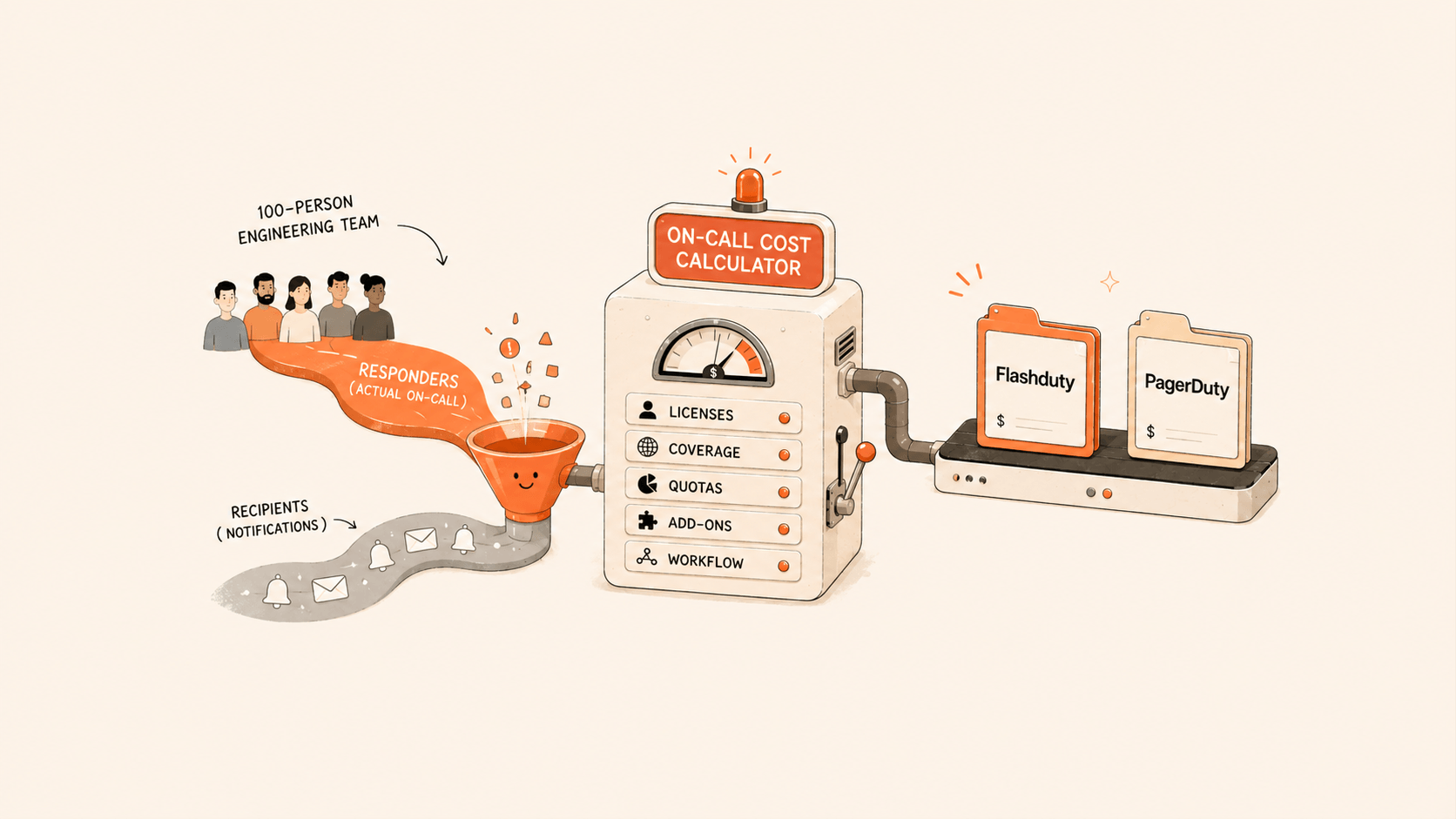
In a 100-person engineering organization, only 10 to 20 people may regularly participate in schedules, acknowledge incidents, adjust dispatch policies, and handle escalation. But during an incident, many more people may need to receive notifications: developers, QA, operations, DBAs, network engineers, security teams, business owners, or external partners.
If the tool charges for everyone who receives notifications, cost grows with notification coverage. To save money, teams may narrow notifications to a small group of core people. That lowers the short-term budget, but creates a long-term risk: critical incidents may not reach the people who need to participate.
So On-call cost is not just "price per user per month." A better calculation starts with three questions:
- How many people need to log in and handle incidents?
- How many people only need to passively receive notifications?
- Will phone, SMS, and email notification volume create extra cost?
Those questions determine total cost more than the product's unit price.
Separate Responders From Notification Recipients
Not every user in an On-call platform does the same job.
The first group is incident responders. They need to view incident details, acknowledge incidents, close incidents, collaborate in comments, adjust schedules, configure dispatch policies, and review analytics. They need full platform permissions and should be counted in license or seat calculations.
The second group is notification recipients. They may not need to log in at all. They only need to receive phone calls, SMS, email, IM messages, or status-page notifications when a relevant incident occurs.
In real organizations, the second group is often larger.
For example, during a payment-system incident, the core responders may be the on-call SRE, the payment development owner, the database owner, and the business-system owner. The notification audience may include the broader payment development team, customer support contacts, business duty staff, and managers.
If both groups require full paid seats, a 100-person team can easily become 100 seats.
If the tool separates incident-handling permission from notification coverage, the cost model changes completely.
Flashduty's Cost Model: Licenses for Active Responders
Flashduty On-call uses a license subscription model based on active users. Each license corresponds to one account member, and licensed members can use the full On-call feature set.
The key point: only members who need to view and handle incidents need licenses. Members who only receive alerts passively do not need licenses.
That means a 100-person engineering team does not necessarily need 100 licenses.
A common formula is:
Flashduty monthly cost = number of people who view and handle incidents × license unit price + over-quota communication cost
Flashduty Professional is priced at ¥199/user/month. Standard and Professional do not limit maximum users, schedules, workspaces, or daily alert volume. The Free plan is useful for evaluation, but it is limited to 5 users, 1 schedule, 1 workspace, and 100 alerts per day; alerts beyond the limit are silently discarded.
Notification quotas should also be included. Standard includes 500 free SMS messages, 50 free phone minutes, and 2,000 free emails per user per month. Professional includes 1,000 free SMS messages, 100 free phone minutes, and 5,000 free emails per user per month. Overages are billed by usage: SMS at ¥0.05/message, phone at ¥0.12/minute, and email at ¥0.0018/message. Webhooks are unlimited.
So Flashduty cost has two parts:
One part is licenses for core responders.
The other is whether phone, SMS, and email exceed included quotas.
For most teams, licenses are the main cost and communication is a variable cost to monitor.
PagerDuty's Cost Model: User Seats and Add-ons
PagerDuty's public pricing page lists Incident Management plans such as Free, Professional, Business, and Enterprise. Business is listed at $41/user/month annually or $49/user/month monthly. Professional is listed at $21/user/month annually or $25/user/month monthly. Enterprise is custom pricing.
PagerDuty also lists Add-ons such as AIOps, Stakeholder License, Status Pages, Live Call Routing, and PagerDuty Advance. AIOps and PagerDuty Advance are additional purchases; PagerDuty Advance for Incident Management starts at $415/month, and AIOps starts at $699/month.
This matters for budgeting.
If the team only needs basic On-call, schedules, and escalation policies, the calculation is relatively simple.
If the team also needs AIOps, more status pages, stakeholder users, Live Call Routing, or advanced AI features, budget cannot be based on base seat price alone.
More importantly, PagerDuty's public AIOps pricing page states that everyone added to a PagerDuty account is a paid user, including users who receive notifications or participate in schedules.
So when estimating PagerDuty cost, first determine how many people need to be in the account, receive notifications, appear in schedules, or participate in response.
A simplified formula is:
PagerDuty monthly cost = paid users × plan unit price + Add-ons + possible notification or service costs
The paid-user count is the key difference.
A 100-Person Team Example
Assume a 100-person engineering organization with this structure:
| Person type | Count | Handles incidents? | Receives notifications? |
|---|---|---|---|
| Frontline SRE / operations on-call | 8 | Yes | Yes |
| Core development owners | 5 | Yes | Yes |
| Team leaders / platform admins | 2 | Yes | Yes |
| Other developers, QA, DBAs, security, business contacts | 85 | No | Yes |
This team has 15 people who regularly view and handle incidents, while all 100 people may need to receive notifications for relevant incidents.
With Flashduty Professional:
15 licenses × ¥199/user/month = ¥2,985/month
Annual license cost = ¥2,985 × 12 = ¥35,820/year
Notification quotas accumulate by license count:
Professional monthly SMS quota = 15 × 1,000 = 15,000 messages
Professional monthly phone quota = 15 × 100 = 1,500 minutes
Professional monthly email quota = 15 × 5,000 = 75,000 emails
As long as actual SMS, phone, and email usage stays within quota, there is no additional communication cost. Overage is billed by unit price.
With PagerDuty Business annual pricing:
100 users × $41/user/month = $4,100/month
Annual seat cost = $4,100 × 12 = $49,200/year
If procurement needs a CNY budget, use:
PagerDuty annual CNY budget ≈ $49,200 × procurement exchange rate
Using 7.2 only as an example exchange rate:
$49,200 × 7.2 = ¥354,240/year
The exchange rate is a calculation variable, not a quote. Use the contract, payment, or finance rate when purchasing.
In this example, Flashduty annual license cost is ¥35,820, while PagerDuty Business annual seat cost is about ¥354,240. The gap mainly comes from who is counted: 15 incident responders versus 100 people who need coverage.
Do Not Calculate Seats Without Notification Coverage
Many teams make a seemingly reasonable budget shortcut: buy seats only for 15 core responders.
The monthly cost falls, but the tradeoff is obvious.
During incidents, many relevant people will not be notified. Business owners may not know the impact. DBAs may not know they need to join. Developers may not know their service is escalating. Managers may wait for someone to forward a group message manually.
That is not a healthy On-call process.
The value of an On-call platform is not to send more messages to fewer people. It is to send actionable information to the right people at the right time. Cost modeling should follow that goal.
Compare solutions with these questions:
| Metric | Question to ask |
|---|---|
| Responder-seat cost | How many people need to log in and handle incidents? |
| Notification-coverage cost | To cover 100, 200, or more people, does everyone need a paid seat? |
| Communication quota cost | Are phone, SMS, and email included? How are overages billed? |
| Advanced capability cost | Are AIOps, status pages, ticketing, AI summaries, and postmortems included in the plan? |
| Support cost | Are dedicated service, remote support, and private deployment billed separately? |
Looking only at the first row underestimates cost.
Ignoring the second row sacrifices notification coverage.
Ignoring the third row creates surprises during alert storms or frequent escalation.
Ignoring the fourth row misses Add-ons.
Ignoring the fifth row underestimates rollout cost.
How Many Licenses Does a 100-Person Team Need?
Do not estimate licenses from total headcount. Estimate from incident-response responsibility.
Start with four groups:
First, people who actually participate in schedules: primary on-call, backup on-call, holiday rotations, and regional rotations.
Second, people who need to handle incidents in the platform: acknowledge, close, snooze, comment, merge, reassign, and manually escalate.
Third, people who configure the On-call process: schedules, dispatch policies, escalation rules, notification templates, silences, and suppression policies.
Fourth, people who regularly view incident details and analytics: SRE leads, operations leads, platform leads, and some team leaders.
These groups are usually the core license population.
Everyone else can start as a notification-only member if they do not need platform handling permissions. This keeps notification coverage independent from incident-handling permission and avoids shrinking alerts into a small circle just to save seats.
Include Plan Capabilities in the Cost Model
Lower cost is not automatically better. The goal is the lowest total cost that covers required capabilities.
Flashduty Free works for individuals or small-team trials, but not for a production-grade 100-person team. The reason is straightforward: Free allows up to 5 users, 100 alerts per day, 1 schedule, and 1 workspace, and it does not include alert grouping, suppression policies, analytics, IM integrations, service calendar, AI incident summaries, postmortems, war rooms, or ticket integrations.
Standard is suitable for small and midsize teams. It includes core On-call features, suppression policies, alert grouping, rule-based grouping, alert storms, analytics, change integrations, Webhook integrations, and custom fields.
Professional is built for enterprise production environments. It includes intelligent alert grouping, IM integrations, service calendar, custom notification templates, custom on-call roles, advanced label enrichment, historical incident search, novelty detection, external incident creation, postmortems, internal status pages, AI incident summaries, war rooms, and Jira/ServiceNow ticket integrations.
If you only need to validate ingestion and notification, Free or trial can complete the first step.
If you need formal On-call, alert noise reduction, dispatch escalation, and analytics, model at least Standard or Professional.
If you need Feishu, DingTalk, and WeCom IM integrations, AI summaries, postmortems, war rooms, and ticketing, evaluate Professional directly.
This matters because many procurement comparisons look like price comparisons, but are actually comparisons between different capability sets.
A Reusable On-call Cost Table
Put these rows into a spreadsheet:
| Item | How to fill it in |
|---|---|
| Total engineering headcount | Example: 100 |
| People who handle incidents | Example: 15 |
| Notification-only people | Total headcount - responders, example: 85 |
| Flashduty license unit price | Professional ¥199/user/month |
| Flashduty monthly license cost | Responders × ¥199 |
| Flashduty annual license cost | Monthly license cost × 12 |
| PagerDuty user count | People who need account access, notifications, or schedules |
| PagerDuty Business annual unit price | $41/user/month |
| PagerDuty monthly seat cost | Users × $41 |
| PagerDuty annual seat cost | Monthly seat cost × 12 |
| Exchange-rate variable | Confirm with procurement or finance |
| Add-ons | AIOps, Stakeholder License, Status Pages, Live Call Routing, PagerDuty Advance, etc. |
| Communication cost | Phone, SMS, email quotas and overage fees |
The point is not to produce one universal number. It is to make the cost structure explicit.
When there are 15 responders and 100 notification-covered people, Flashduty's cost advantage is obvious.
When responder count and notification coverage are similar, the difference narrows.
When large Add-ons or private deployment are needed, include contract pricing, support, and implementation cost in the same model.
When to Pay Close Attention to Flashduty's Cost Advantage
If your team has only 5 to 10 people and everyone handles incidents, the difference between responder-based licensing and all-user seats may not be large.
But calculate carefully if:
- The engineering organization has more than 50 people, but daily incident responders are only a subset.
- Development, operations, QA, security, and business owners all need notification coverage.
- Alert sources include Prometheus, Zabbix, Nightingale, Grafana, cloud monitoring, BlueKing, Open-Falcon, or internal systems.
- The team is already narrowing notification coverage to save seats.
- Incident notification and collaboration must work in Feishu, DingTalk, and WeCom.
- Critical alerts need phone, SMS, and App push as fallback channels.
- You want to unify alert response without replacing existing monitoring systems.
These teams are not just buying a cheap notification tool. They are building an On-call process that is cost-controlled, broadly covered, and continuously governed.
Final Advice: Use Your Real Organization, Not Average Unit Price
The correct way to calculate On-call cost is not to open a pricing page and multiply unit price by total headcount.
Map the real response workflow first:
Who is on call?
Who handles incidents?
Who escalates?
Who only receives notifications?
Who needs analytics?
Which incidents require phone calls?
Which incidents only go to IM?
Which teams need status pages or ticket sync?
Then put those people and actions into the cost model.
For a 100-person engineering team, the most common waste is paying for every notification recipient as a full responder. The most common risk is limiting alert coverage to a few people to control cost, which breaks the response chain.
Flashduty's license model separates the two: people who handle incidents hold licenses; other relevant people can still receive notifications.
That is not just a price difference. It is a different cost structure for On-call.
If you are evaluating PagerDuty or another On-call tool, use a real business system for a 14-day trial: connect one alert source, configure schedules and dispatch policies, run SMS, phone, IM, escalation, and closure once, and then compare alert volume, notification volume, responder count, and response metrics.
Calculate clearly first. Then discuss procurement.
Sources:
- Flashduty pricing: license subscription, notification quota, plan capability, and resource limits. https://docs.flashcat.cloud/zh/platform/pricing
- Flashduty product comparison: feature, service, and pricing model comparison with PagerDuty. https://docs.flashcat.cloud/zh/on-call/quickstart/comparison
- PagerDuty public pricing: Incident Management Professional / Business / Enterprise pricing, Add-ons, and PagerDuty Advance pricing. https://www.pagerduty.com/pricing/
- PagerDuty AIOps pricing: AIOps starting price and user billing notes. https://www.pagerduty.com/pricing/aiops/