
Google's SRE book makes an important point: to make SRE work land well in practice, scheduled OnCall is a key part of the system. Many people do not immediately see why. This article explains the underlying logic.
Let's start with a basic explanation.
Scheduled alert OnCall means assigning system alerts to operations engineers based on a defined rotation. This model brings several benefits:
- Faster response time. An OnCall system ensures that someone is explicitly responsible for handling system alerts, reducing response and repair time while improving availability and stability.
- Higher operations efficiency. A duty rotation helps operations engineers allocate work more effectively, avoid duplicate work and overlapping tasks, and improve both efficiency and quality.
- Stronger team cohesion. OnCall encourages communication and collaboration across team members, improving teamwork and the overall capability of the team.
SRE teams should implement OnCall for these reasons:
- Protect system stability. In complex IT environments, stability is critical. OnCall helps ensure system failures are handled promptly, protecting availability.
- Improve operations quality. OnCall helps engineers focus on the right work with fewer interruptions, improving operations quality and efficiency.
- Strengthen collaboration. OnCall gives team members a clearer way to work together on failures and problems, improving the team's overall execution.
In short, SRE teams should implement OnCall to protect system stability and availability, improve operations quality and efficiency, and strengthen collaboration.
Here is my own view.
It Helps Keep the Team Stable
Everyone wants to do work that feels productive and sustainable. OnCall is usually not that kind of work. For example, when we answer questions in the Nightingale monitoring community, many people have not read How To Ask Questions The Smart Way, and sometimes that can be frustrating for the person on duty.
If unpleasant work always falls on one specific person, that person is not far from leaving. A rotation is one way to solve this problem. Everyone takes a turn, perhaps once a week. The duty week may not be enjoyable, but at least there is a clear end to it.
It Helps Knowledge Accumulate
The person on duty naturally wants visible output from the duty period. The most visible output is often documentation, FAQs, and similar knowledge assets. If the team can build self-service platforms from that work, even better.
Because nobody wants OnCall to stay painful forever, everyone has an incentive to improve it. When everyone participates in the rotation, everyone has a reason to make the system better.
It Provides Better Support
When someone is clearly on duty for the week, they stop taking on unrelated work and stay ready to help users solve problems. For users, response speed improves and the experience is better.
Without a schedule, people can easily pass work back and forth: one person is busy with this, another is busy with that, and customer tickets sit unresolved. SRE teams often use a dedicated duty phone for incident response. The SMS ringtone on that phone is usually very long and very loud, making sure responders do not miss urgent issues.
So what tools can support scheduling?
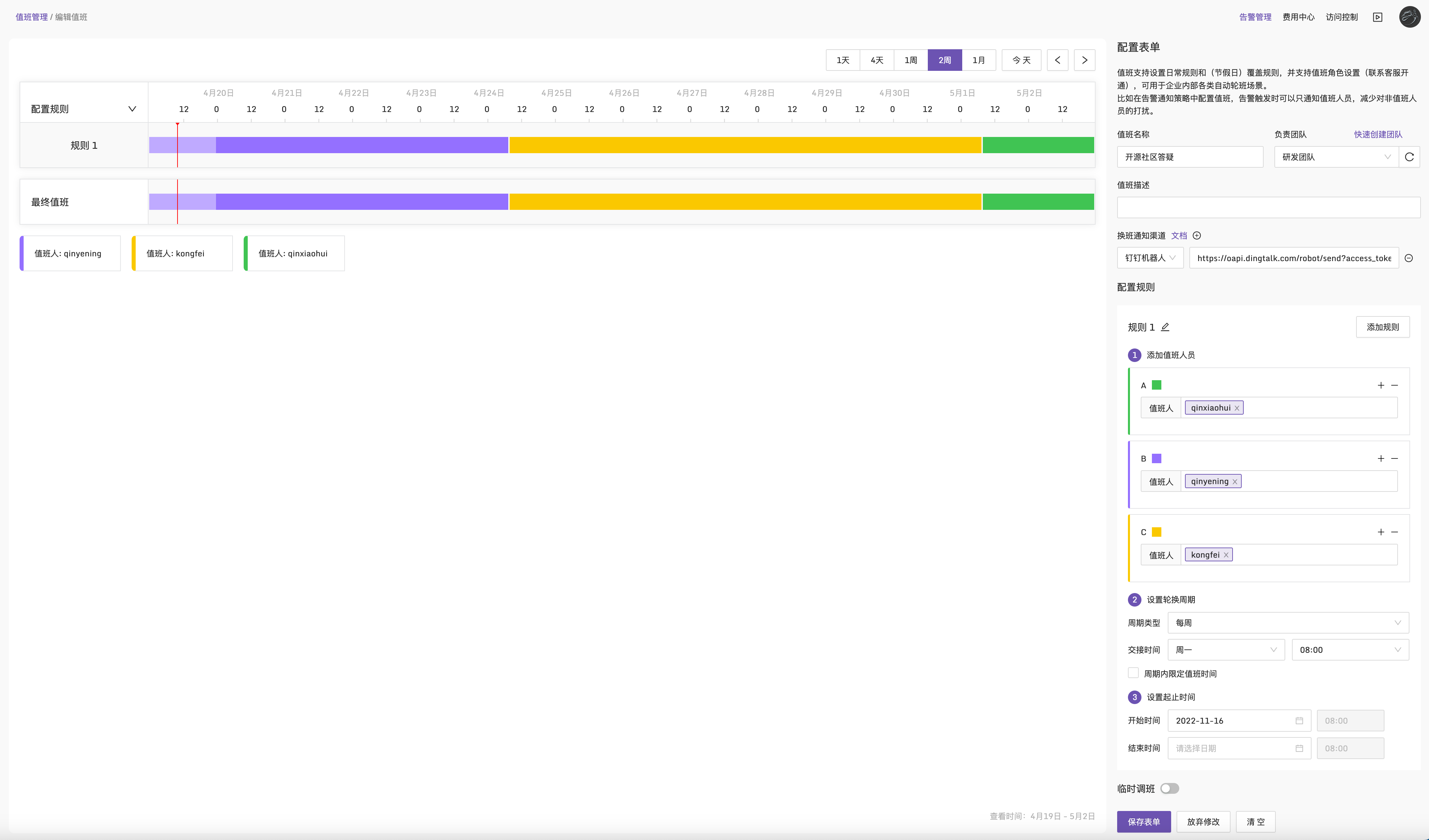
The simplest option is a shared spreadsheet. It works, but it is awkward. Holiday changes, temporary swaps, and rotation reminders all become manual work. Products such as PagerDuty and Flashduty support this use case, and their scheduling capabilities are free to try. A typical result looks like this: