
Zabbix should not be replaced just for the sake of replacing it.
Many teams have run Zabbix for years. Hosts, network devices, databases, middleware, and data-center resources are already modeled there. Items, templates, triggers, host groups, permissions, and operational habits have all accumulated inside Zabbix. Rebuilding that monitoring system just to improve alert response is usually expensive and unnecessary.
The real problem is usually not that "Zabbix is bad." It is that after Zabbix sends an alert, the team does not have a unified response workflow.
Alerts land in email, SMS, scripts, IM groups, or Webhooks, but nobody knows who should take ownership. Someone replies "I'll check" in chat, but there is no acknowledged state in the system. One root cause triggers dozens of alerts and repeatedly interrupts the on-call engineer. A Critical alert goes unanswered and still needs manual chasing. At the end of the month, the team can only guess which systems generated the most noise or which teams responded slowly.
Replacing Zabbix does not solve these problems. Sending Zabbix alerts into Flashduty does: noise reduction, dispatch, escalation, collaboration, and analytics all become part of the same response loop.
Set the Boundary: Zabbix Monitors, Flashduty Responds
Zabbix is strong at monitoring.
It collects metrics, configures triggers, detects problems, shows them in the Problem view, and sends notifications through media types and actions. In Zabbix's notification model, media types define notification channels, actions define when operations run, and operations send messages or execute remote commands.
That model is good at getting an alert out.
On-call response has to answer a different set of questions:
- Which team should own this alert?
- Who is currently on call?
- If the primary responder does not acknowledge it, when should it escalate to the backup?
- Do trigger, recovery, update, and handling actions share one timeline?
- Should duplicate alerts be merged into the same incident?
- Which Zabbix triggers create the most noise?
- Did MTTA, MTTR, response rate, and interruption count improve this month?
Those are not just notification-delivery questions. They are incident response management questions.
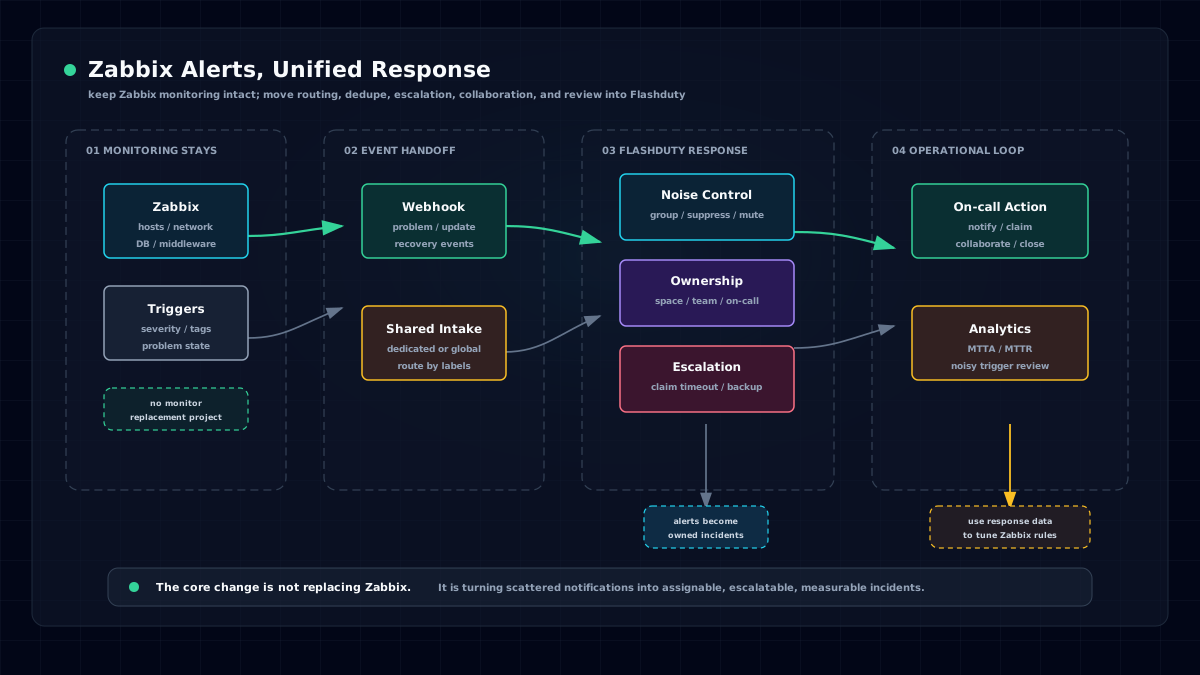
A more sustainable architecture is to keep Zabbix responsible for monitoring and triggering alerts, and use Flashduty as the unified alert response platform that turns Zabbix events into incidents that can be routed, acknowledged, escalated, and analyzed.
Why Zabbix Alerts Become "Ignored"
Alerts are not ignored because teams have no notifications at all. They are ignored because the notification workflow lacks state and ownership.
The first problem is scattered notification channels.
Infrastructure alerts go to an operations group, database alerts go to DBAs, application alerts go to developers, and older systems may still send email. The more entry points you have, the harder it is to know which alert is already being handled.
The second problem is repeated interruption.
A failed core switch can make many hosts unreachable. An exhausted database connection pool can trigger application error-rate and timeout alerts. A brief network flap can repeatedly fire and recover. The on-call engineer receives dozens of notifications, even though there may be only one incident to handle.
The third problem is unclear responsibility.
Zabbix actions can notify a user or user group, and escalation steps can notify again or escalate to another group. But in a multi-team environment with primary and backup on-call roles, temporary swaps, and frequently changing business owners, encoding "who is responsible today" inside notification rules quickly becomes hidden knowledge.
The fourth problem is missing retrospective data.
When did the alert trigger? Who was notified? Who acknowledged it? When was it closed? Was it escalated? How many duplicate notifications interrupted the responder? If this information is spread across Zabbix, email, chat, and manual notes, it is hard to improve alert rules or on-call processes.
Flashduty fills those gaps.
How to Send Zabbix Alerts to Flashduty
The core integration path is Webhook.
In Flashduty, create a Zabbix alert integration and copy the push URL. There are two ways to do this:
- Dedicated integration: create a Zabbix integration inside a workspace, so alerts go directly into that workspace. This works well for a single team or a first trial.
- Shared integration: create a global Zabbix integration in the integration center, then use routing rules to dispatch alerts to different workspaces. This works well when multiple business teams share one Zabbix instance.
For a first validation, start with a dedicated integration. It has fewer moving parts and quickly proves that Zabbix can reach Flashduty.
For a company-wide Zabbix instance serving multiple business lines, use a shared integration. Shared integrations can route by labels, attributes, severity, and other conditions. They can also map a label value to a workspace name, such as sending alerts with team=payment to the Payment workspace and team=db to the Database workspace.
On the Zabbix side, configuration differs slightly by version, but the main flow is the same:
- Create or import the Flashduty media type.
- Attach that media type to a user, and make sure the user has at least read permission for the related hosts.
- Create a trigger action that sends notifications to that user through the Flashduty media type.
- Configure Problem, Recovery, and Update operations so trigger, recovery, and update events are all synchronized.
- Check
Monitoring > Problemsand inspect the send log in Actions. When the Flashduty integration card shows the latest event time, the link is working.
Flashduty's Zabbix integration docs provide different setup methods by version. Zabbix 7.x uses imported media type configuration; 5.x and 6.x use XML/YAML configuration; 3.x and 4.x use scripts that depend on curl and jq. These version differences matter when migrating older Zabbix environments. Do not apply a new-version screenshot to an old-version console without checking the details.
After ingestion, Zabbix severities map to Flashduty's standard severity levels: Disaster and High become Critical; Average and Warning become Warning; Information and Not classified become Info.
The goal is not to change Zabbix's monitoring logic. The goal is to reliably send Zabbix events into the response platform.
After Integration, Start With Noise Reduction
When teams add a new notification channel, the instinct is often to notify more people.
That usually makes the problem worse.
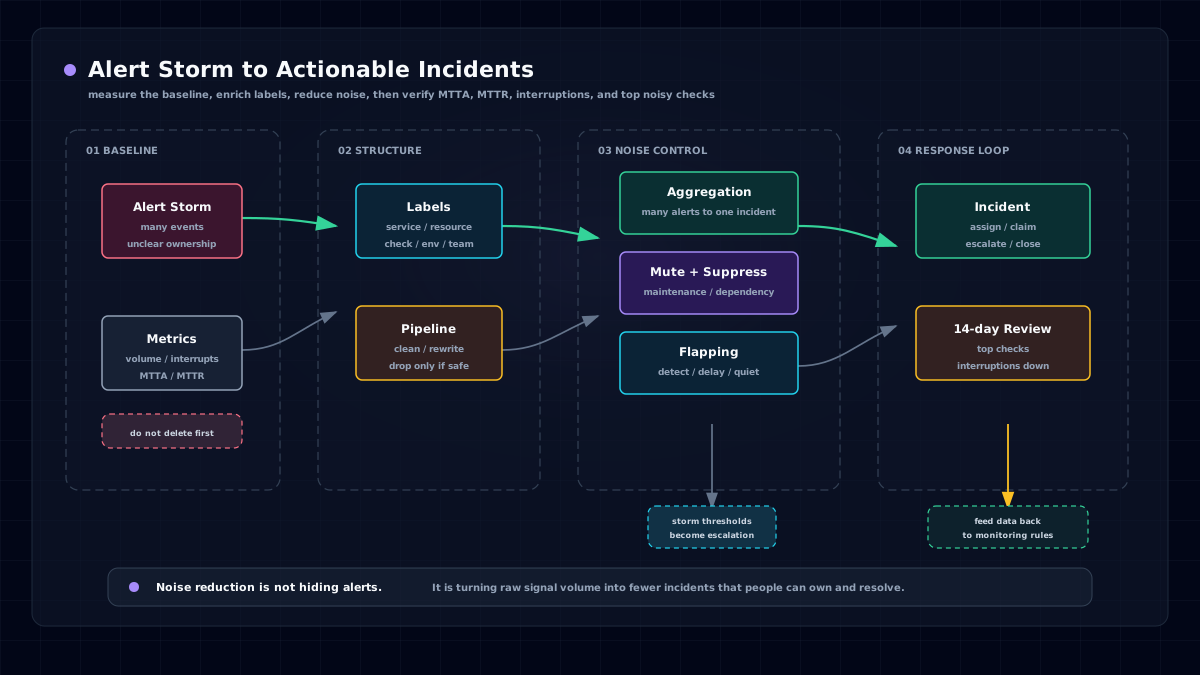
If the original alert stream is already noisy, replacing email with phone calls, SMS, or IM group messages only increases responder fatigue. A better order is: ingest alerts first, reduce duplicates, flapping alerts, maintenance-window alerts, and derived alerts next, and then design notification policies.
Flashduty models raw notifications from monitoring systems as events. Events trigger alerts, and similar alerts can be grouped into incidents. Responders mainly handle incidents, not every individual Zabbix event.
That distinction matters for Zabbix users.
For example, if a group of hosts becomes unreachable because of the same network issue, the on-call engineer may receive dozens of Zabbix notifications without noise reduction. With grouping enabled, similar alerts merge into one incident, and later alerts enter that incident without retriggering notifications.
Flashduty supports two grouping modes:
- Intelligent grouping: calculates similarity from fields such as title, description,
labels.service, andlabels.resource. Good for fast adoption. - Rule-based grouping: exactly matches specified attributes or labels. Good for teams that need explicit grouping boundaries.
You can also configure storm warnings, flapping detection, silences, and suppression policies.
Storm warnings record an alert storm event and trigger additional notification when the number of grouped alerts reaches a threshold. Flapping detection identifies incidents that repeatedly trigger and recover. Silences are useful for maintenance windows or known issues, and can match severity, title, description, integration source, and labels. Suppression is useful when a root-cause alert exists and lower-priority derived alerts should not interrupt responders, such as suppressing Warning/Info alerts for the same check when a Critical alert already exists.
For Zabbix, start with three basic rules:
- Group duplicate alerts by host, check item, or business label.
- Silence maintenance windows, bulk changes, and known low-value alerts.
- Suppress derived Warning/Info alerts when a clear high-severity root-cause alert exists.
Do not start with complex rules. Take the noisiest 20 triggers first. That usually produces the clearest improvement.
Use Routing Rules When Multiple Teams Share Zabbix
A common pattern in traditional Zabbix environments is centralized monitoring but decentralized response.
The operations team may maintain Zabbix, while payment, trading, account, order, data platform, DBA, network, and security teams own the actual response. Sending every alert into one group interrupts everyone with irrelevant information. Asking operations to manually forward every alert turns the team into a routing desk.
Shared integrations and routing rules solve this.
A shared integration receives Zabbix events through one entry point and then routes them into different workspaces. Routing rules can match labels and attributes, support exact, wildcard, and regex matching, and provide a default route. Flow control can either continue matching after a hit or stop at the first match.
A typical design might be:
severity=Criticalinfrastructure alerts go to the SRE workspace.team=paymentapplication alerts go to the Payment workspace.host_group=DBorservice=mysqlalerts go to the DBA workspace.- Alerts with no identifiable owner go to a default alert workspace for the platform team to improve.
If the original Zabbix event labels are not standardized, use label enrichment. Flashduty can extract, combine, map, and delete labels. Those labels then drive routing, filtering, dispatch, grouping, silencing, and suppression.
The point is to let alerts automatically find the responsible team, not to have someone forward messages in chat every day.
Design Dispatch Policies Around Incident Value
Calling everyone for every alert is the fastest way to create on-call fatigue.
Dispatch policies should reflect incident value:
- Critical: must be handled immediately, with strong channels such as phone, SMS, App push, or IM direct message.
- Warning: needs attention, but may not need to wake someone up. IM group or App notification is often enough.
- Info: status notification only, usually outside the strong notification path.
Flashduty dispatch policies include trigger conditions, notification targets, notification methods, delay windows, templates, and escalation rules. Conditions can filter by title, severity, labels, and other fields. Targets can be schedules, teams, individuals, or combinations of them. Notification methods include phone, SMS, email, App push, IM direct messages, and group chat.
A practical starting policy for Zabbix alerts is:
- Notify the current primary on-call responder for Critical alerts, with phone or SMS as a fallback.
- Escalate to the backup responder if nobody acknowledges within 10 minutes.
- Escalate to the related business owner or SRE lead if the incident is not closed within 30 minutes.
- Send Warning alerts to the team IM group, and notify individuals only during working hours.
- Let Info alerts enter the incident list and analytics without triggering strong notification.
Use delay windows carefully. For short-lived flaps that often self-recover, waiting before the first notification can avoid unnecessary interruption. If the incident closes during the delay window, no notification is sent. That is more sustainable than calling the on-call engineer for every transient anomaly.
Do Not Keep Schedules in Group Announcements or Excel
Zabbix actions can notify fixed users or user groups, but real on-call rotations are rarely static lists.
Teams have primary and backup responders, day and night shifts, weekend coverage, holiday schedules, temporary swaps, and leave requests. If schedules live in group announcements, Excel files, or someone's memory, two problems appear quickly: the right person may not be notified, and the wrong person may keep getting interrupted.
Flashduty schedules connect incidents with the current responder. Schedule rules support hourly, daily, weekly, and monthly rotations, as well as day/night shifts, primary/backup roles, date masks, temporary swaps, and fair rotation. Dispatch policies can notify the current responder in a schedule, or only specific roles such as primary or backup.
That means Zabbix does not need to know who is on call today.
Zabbix sends the event. Flashduty uses the current schedule and dispatch policy to decide who to notify, which channel to use, and how to escalate if there is no response.
From "Alert Sent" to "Incident Acknowledged"
Sending a notification does not mean someone is handling the incident.
This is one of the easiest differences to miss in a Zabbix alerting system.
In Flashduty, Zabbix events trigger alerts, and alerts trigger incidents. Incidents have handling states: open, in progress, and closed. A responder can acknowledge an incident after receiving a notification; the incident then moves into handling. If the alert automatically recovers, the incident can close automatically. A responder can also close, snooze, merge, or reassign it manually.
The incident detail page records a timeline: trigger, dispatch, notification, acknowledgement, closure, and other actions. During a review, the team no longer has to read chat logs and guess when the alert fired, who received it, who acknowledged it, whether it escalated, or when it closed.
For operations leaders, this goes beyond a Zabbix action showing Sent.
Sent only means the message left the system.
Acknowledged means someone accepted response ownership.
Use Analytics to Improve Zabbix Alert Governance
After connecting Zabbix to Flashduty, do not only check whether notifications arrive.
Use data to decide what to improve next.
Flashduty analytics show incident data by team, workspace, individual, and other dimensions. Metrics include incident count, MTTA, MTTR, response rate, response effort, and interruption count. Time can be split into working time, rest time, and sleep time. Global views also show top alert checks and alert objects, with PDF download and CSV export.
This directly helps Zabbix alert governance.
If a trigger stays in the top 20 for a long time, revisit its expression, threshold, dependencies, and maintenance windows in Zabbix.
If a host or host group keeps generating many Warning alerts, check capacity, template fit, or alert thresholds.
If Critical MTTA is too long, review schedules, notification channels, and escalation policies.
If sleep-time interruptions are too high, review night-time notification tiers and flapping detection.
Without this data, alert governance becomes a debate.
With it, the team can improve Zabbix rules and on-call processes with facts.
Validate These 8 Things in 10 Minutes
If you are evaluating whether to send Zabbix alerts into Flashduty, do not start with a full migration. Pick one real business workspace and run a few high-value alerts through the full loop.
Use this checklist:
- Create a dedicated or shared Zabbix integration in Flashduty and copy the push URL.
- Import or create the Flashduty media type in Zabbix, and fill in the URL, Zabbix console address, and proxy settings.
- Attach the media type to a user with host read permission.
- Create a trigger action and configure Problem, Recovery, and Update operations.
- Trigger a test alert and confirm that Zabbix Actions show a successful send and the Flashduty integration card shows the latest event time.
- Check that Zabbix severities map correctly to Critical, Warning, and Info.
- Configure a dispatch policy that notifies the current on-call responder for Critical alerts and escalates if unacknowledged.
- Enable one grouping or silence rule and watch whether duplicate alerts create fewer interruptions.
After these steps work, expand gradually: from one workspace to many, from a small set of Critical alerts to Warning alerts, and from a dedicated integration to shared integration plus routing rules.
Conclusion: Do Not Replace Zabbix. Unify Alert Response First.
Zabbix can keep doing what it does well: collection, monitoring, triggering, and problem display.
Flashduty adds the response layer after Zabbix sends an alert: unified ingestion, routing, label enrichment, noise reduction, on-call dispatch, automatic escalation, acknowledgement, timeline, and analytics.
For teams already using Zabbix, the safest path is not to rebuild everything. Start with one real set of alerts in Flashduty. Spend 10 minutes connecting the pipeline and 14 days observing compression, acknowledgement speed, escalation quality, and interruption count. Then decide whether to expand to more business teams.
If your Zabbix alerts already reach chat but are not owned, or if night-time alerts are exhausting responders, start with one workspace: connect Zabbix, configure a schedule, enable noise reduction, and add unacknowledged escalation so the first alert truly enters a closed loop.
References
- Zabbix official documentation: Notifications upon events / Media types / Actions / Webhook
https://www.zabbix.com/documentation/current/en/manual/quickstart/notification
https://www.zabbix.com/documentation/current/zh/manual/config/notifications/media/webhook
https://www.zabbix.com/documentation/current/en/manual/config/notifications/action - Flashduty product documentation: Zabbix integrations, integration data, routing rules, label enrichment, noise reduction, dispatch policies, schedule management, incident lifecycle, and analytics.