

Dear Flashduty users,
Today, we officially launch the Flashduty mobile app! No matter where you are, you can control everything just like at your workstation.
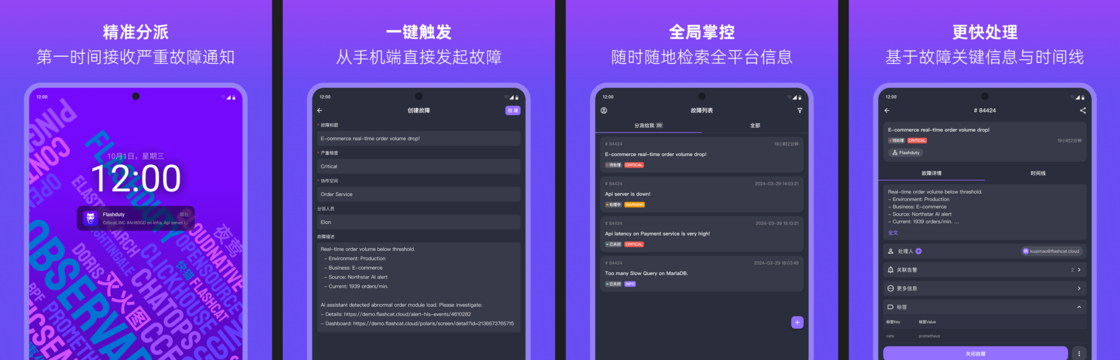
Key Feature Highlights
1. Incident Management at Your Fingertips
- Full Mobile Workflow: Supports incident retrieval, detailed viewing, claiming, closing, escalating, and manual triggering, with deep optimization for mobile interaction, increasing key operation response speed by 40%.
- Multi-dimensional Information Aggregation: Incident timeline, handling records, and associated logs are centrally displayed to aid quick decision-making.
Scenario Value: What you can do at your workstation, you can do just as efficiently on your phone.
2. Critical Notifications, Never Miss a Beat
- iOS Critical Alerts: Based on Apple's official Critical Alerts protocol, breaks through Do Not Disturb mode restrictions, ensuring 100% delivery of severe alerts.
- Android System-level Channels: Supports system-level channels on all major Android manufacturers, allowing alerts to reach you even when the app is closed, preventing any misses.
Scenario Value: "Sleeping? In a meeting? Severe incidents will still notify you."
3. Voice Notifications, More Reliable
- Smart Whitelist Synchronization: Automatically adds Flashduty voice numbers to your phone's contacts, avoiding the risk of operator misinterception.
Take Action Now
1️⃣ Download and Install
👉 Go to the app store or click to download the Flashduty App (iOS/Android)
2️⃣ Permission Configuration Suggestions
- iOS users: Go to "Settings - Notifications" and enable Critical Alerts for Flashduty.
- All users: In the app, go to "Settings - Voice Notifications" and enable Sync Contacts permission.
Incidents don't wait, but you can always be one step ahead.
— The Flashduty Team