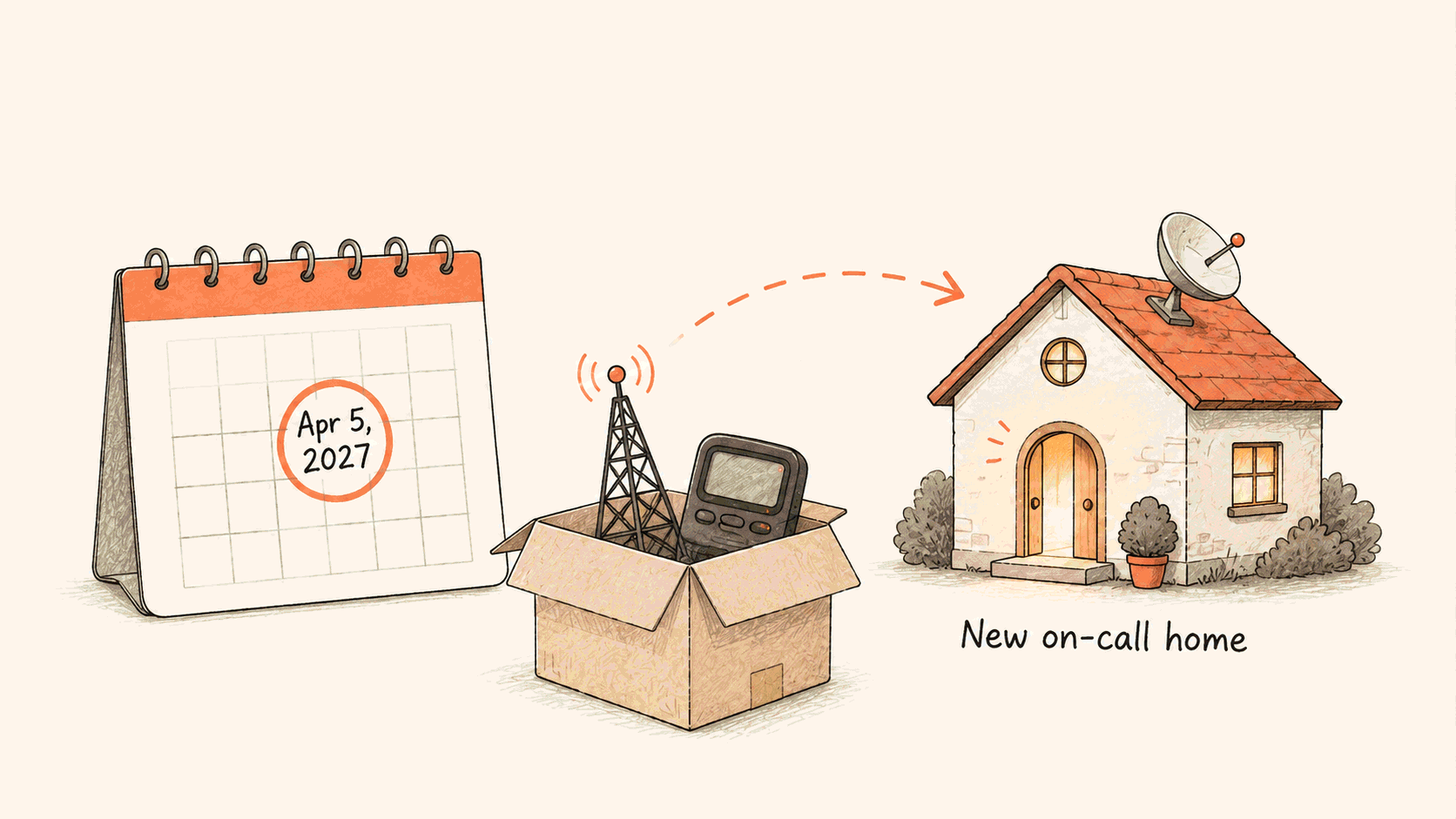

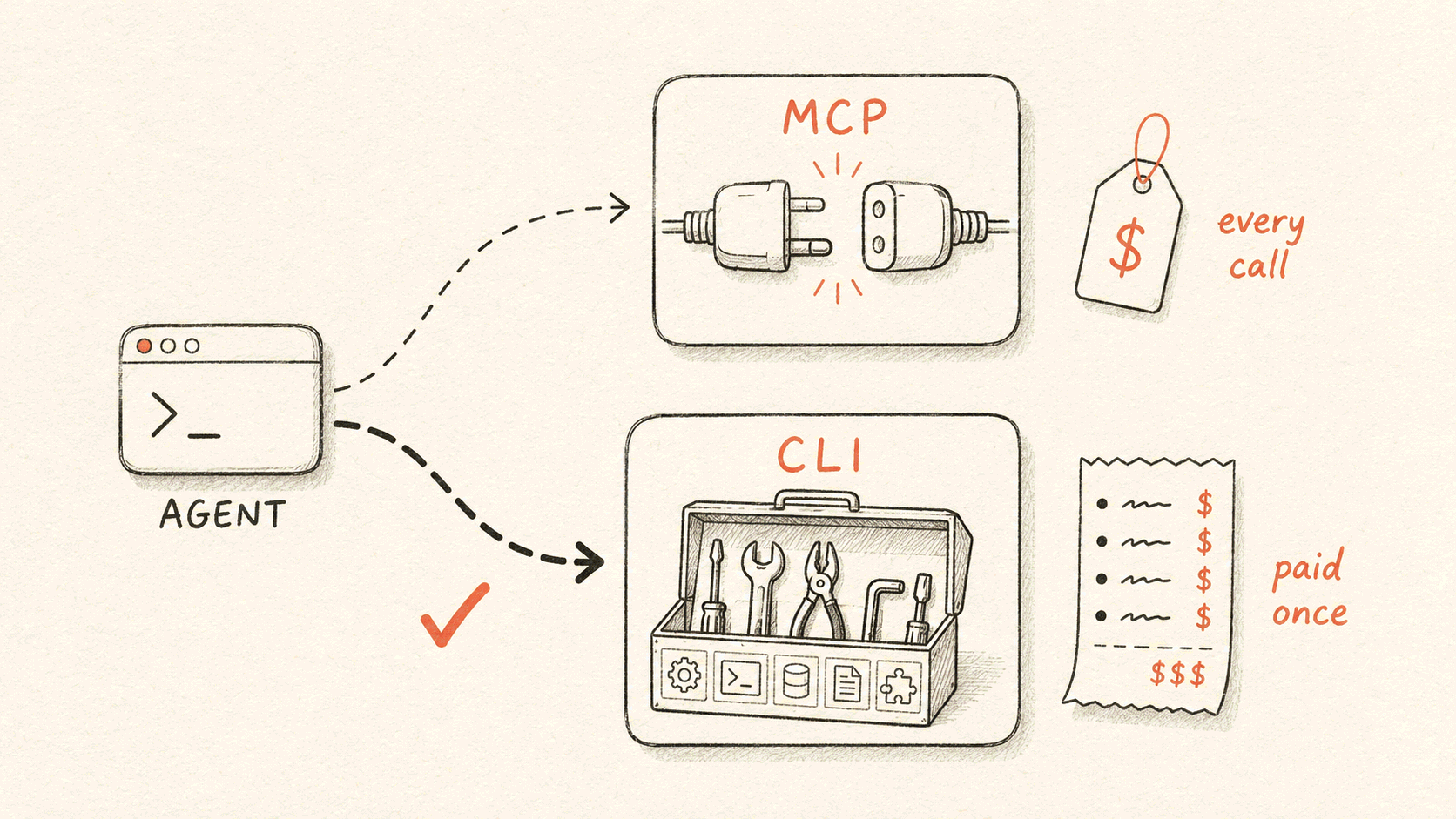
Our AI SRE (site reliability engineering) agent operates Flashduty for users. It queries alerts, acknowledges incidents, checks on-call schedules, and traces recent changes. It got that ability in January, through a built-in Model Context Protocol (MCP) server with 18 tools. In late May, we replaced the MCP server with a command-line interface (CLI). A week later we deleted the MCP path.
Here's our conclusion. If you own the platform, give your agent a CLI. You control the API description, the release pipeline, and the execution environment. So you can pay for tool discovery, credentials, and versioning once, in engineering work, instead of on every call. If you don't own the platform, use MCP. We still do.
The switch cost more than we expected. Here's what we ran into, in order.
Why 18 tools weren't enough
The 18 tools covered the incident lifecycle: query, acknowledge, close, escalation rules, change records, and status-page notices. Everyday requests worked. With so few tools, the agent rarely picked the wrong one.
Investigations were different. When an investigation starts, nobody knows the next step. It might be alerts, the timeline, the on-call record, or a change ticket. Our public API has 290 operations, and any of them can matter.
Why we didn't grow the MCP server
We had two ways to make the MCP server bigger.
The first was full mirroring: wrap all 290 operations as tools. We rejected this option quickly. Hundreds of tool schemas would sit in the model's context all the time. More tools also make the model worse at choosing. We later wrote this into the MCP server's README.
The second was progressive loading. The agent gets two tools: one to search for tools and one to call them. The agent loads only the tools it needs. AWS's MCP server works this way. Our third-party connector loading worked in a similar way at the time.
Two things worried us. First, accuracy. The agent can't see the schemas, so it picks a tool and fills in parameters from a single search. If the search misses or the agent misreads the result, no safeguard catches the error. Second, context only grows. Every search result and loaded schema stays in the session. An investigation makes dozens of calls, and the model gets worse as context fills up.
We had no data for either concern, only intuition. But both concerns point the same way: search-based MCP spreads discovery cost across every call. The longer the session, the more you pay.
Switch to a CLI
The agent's execution environment already has bash. A CLI fixes both concerns:
- The agent reads help text only when it needs it. After that it's plain text, not a tool definition that stays in context.
- The agent can pipe and filter output instead of reading all of it.
- We generate commands from the API description, so we don't build coverage by hand.
Today 289 of the 290 operations are generated. The one exception is a streaming response that we wrote by hand. A dedicated test asserts this ratio.
We didn't run a rigorous comparison before switching. We bet on the shape of the cost instead. With MCP, you pay on every call for as long as you use it. With a CLI, you pay once. That one payment turned out to be large.
Help the agent find the right command
The first skill document listed eight common commands. For everything else, it told the agent to run --help. That seemed safe, because help always matches the installed version.
But the agent had to guess the command name before it could read the help. The document taught statuspage create-incident. The real command is status-page change-create. The agent guessed wrong, looked it up, and guessed again.
The second version added a naming rule. The group comes from the first segment of the API path. The verb comes from the rest, joined with hyphens. The agent then confirms the name with help. A table lists the most common mismatches. Errors dropped, but not to zero.
The current design has two layers. The main file is a bilingual intent index that sends each request to a domain. Each domain has one card that lists all of the domain's commands, flags, enums, and workflows. The cards cover 346 commands in total.
Nobody writes the cards by hand. We generate them by reflecting over the compiled command tree. Continuous integration (CI) then checks every example on every card against that same tree. One wrong example fails the build.
We track accuracy in two ways.
The first is a synthetic question set with over a thousand questions. A stronger model writes the questions, the AI SRE answers, and a model grades the answers. The question set covers common cases. But models write, answer, and grade everything, so the question mix differs from real user questions.
So we also audit more than 50 live sessions in each round. The audits look for failures the question set misses. One audit caught the agent reading "this rule hasn't fired in 90 days" as "this rule isn't configured." It then marked a P0 (highest-priority) check as missing. The command was right and the data was right. The interpretation was wrong.
When the same problem appears in several audits, we add a rule to the skill document. Two examples: "An empty result means no. Don't retry with different keywords." And: "Don't report a command you didn't run as returning empty." This work is ongoing.
Keep the agent from writing JSON
Passing JSON on the command line is error-prone. JSON has quotes, bash has quotes, and models get the nesting wrong. Our environment also parses every command as full shell syntax for a permission check before running it. The parser rejects any unbalanced quote. So this problem is more common in our environment.
The main fix is to keep the agent from writing JSON. When we generate commands, every flat field in the request body becomes its own flag, like --chat-id and --member-ids. Common calls contain no JSON at all.
Some calls still need JSON, such as nested structures or parameters that carry SQL. SQL brings quotes, commas, and newlines. For these, --data - reads the body from stdin. Pair it with a heredoc whose delimiter is quoted. The shell expands nothing inside it, so the content passes through as is.
fduty monit-agent invoke --data - <<'FDUTY'
{"tools":[{"tool":"query","params":{"sql":"SELECT a, b FROM t WHERE s = 'x'"}}]}
FDUTY
This rule came from a production failure. An early name=xxx,params={...} format split parameters on commas. A single SELECT a, b in SQL split the parameters in the wrong place. We deleted the whole format and moved to stdin.
The skill document used to say "prefer heredoc when the parameters contain quotes." Then, in one production session, the command parser rejected normal-looking inline JSON twice. The agent switched to heredoc on its own, and the command succeeded. The guidance now says: always use heredoc, never inline JSON.
Make sure the agent runs the right binary
The agent runs a bare command name. The host might have another version installed, or an unrelated program with the same name. The command still runs, but the results are sometimes wrong, and the cause is hard to find.
We fixed it with PATH. At startup, the execution environment writes its bundled CLI into its own directory. It then puts that directory first on the PATH of every bash session. A bare command name always resolves to our bundled copy.
The names help too. The bundled binary is called fduty. The official install script installs flashduty. They don't collide.
PATH has no effect in one place. One code path starts processes without a shell. It resolves the command name before environment variables apply. On that path, we rewrite the command to an absolute path.
We also hit a more basic bug. Two different places computed "where to install" and "what to put first on PATH." The CLI was installed in directory A while PATH pointed at directory B. The environment started fine, and every agent call failed with command-not-found. Now both values come from one place.
Credentials belong to whoever sent the message
With MCP, the connection and its authentication came from configuration. With a CLI, we had to design identity, permissions, and credential delivery ourselves. The easy case to miss is a shared session. User A opens a war room, and users B and C post in it too. Whose identity does the agent use when it runs a command?
Our rule: use the identity of the person who sent the current message. Each turn, the system issues a credential for that sender. When the turn ends, we delete it. Validation skips the cache, so the deletion takes effect at once.
The gateway resolves the sender with the same function it uses for browser login. So the agent gets exactly the sender's permissions. If we can't identify the sender, we issue nothing.
In design review, we rejected a per-session credential. In a war room, it would let B's commands run as A.
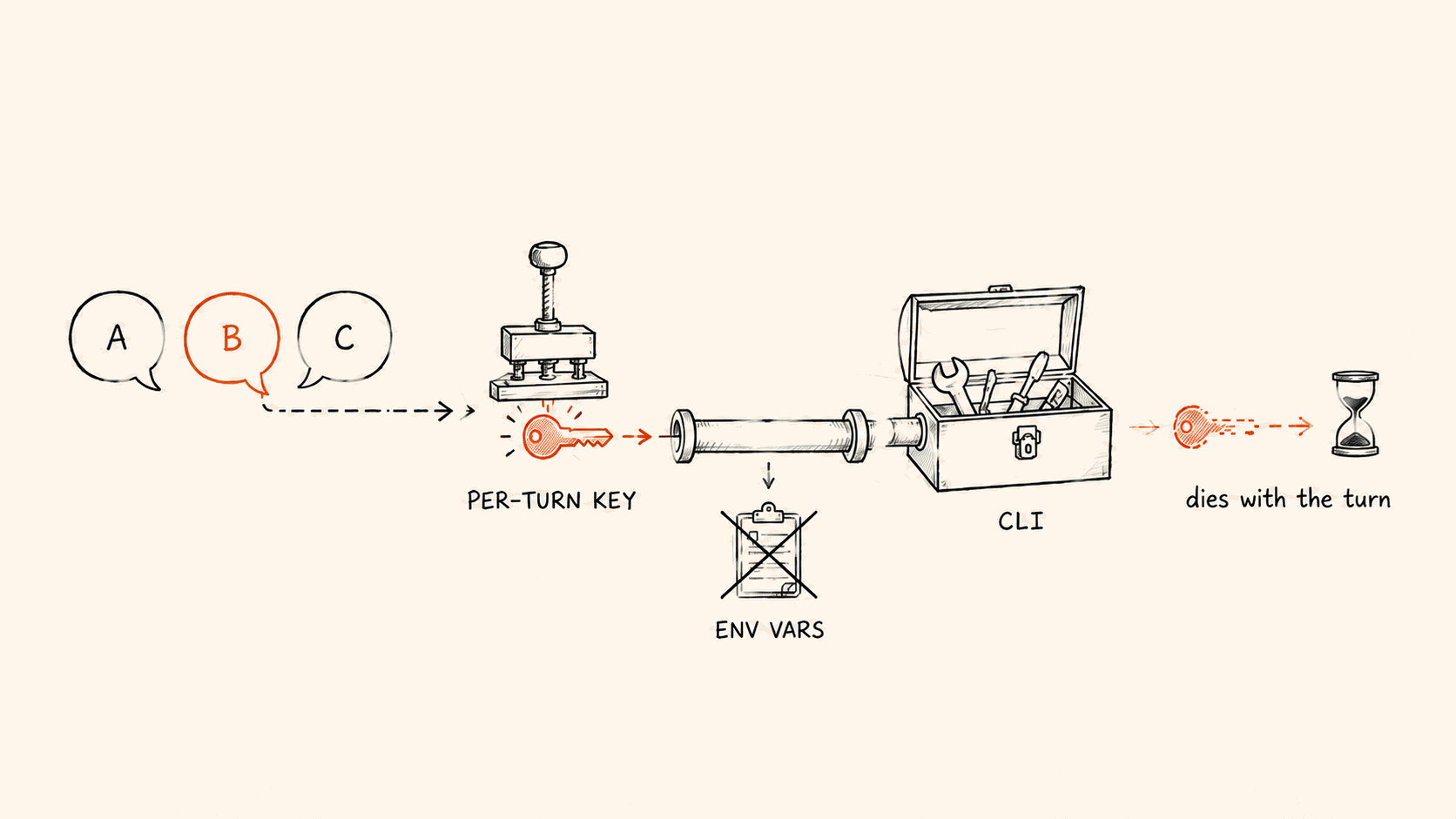
A short-lived credential stops replay. But during its turn, the agent can still print it. An agent debugging its environment will naturally run env or printenv, and the credential lands in the transcript.
So we check every bash command before it runs. We block commands that dump the environment: env, printenv, bare set, export -p, declare -p, compgen -e, and reads of /proc/*/environ. We also block any command that names the credential's variable. The error message tells the agent to read the one variable it needs instead.
This check can't stop a command that builds the variable name on purpose. It stops accidental printing.
The next layer keeps the credential out of the environment. On self-hosted Linux runners, we create a Unix socket pair before starting the subprocess. The credential reaches the CLI through that socket. It never appears in command-line arguments or environment variables, so env can't show it.
Cloud sandboxes can't do this. They fall back to an environment variable that lives for one turn. So "the credential never enters the environment" is only true where the socket bridge works.
Here's what we don't defend against:
- Other processes running as the same sandbox user can use the credential while it's valid. If the CLI can authenticate with it, a neighboring process can get it too. Encryption doesn't change that. We defend against the credential being taken out and replayed later. Our defense is that the credential expires when the turn ends.
- Permissions match the sender's permissions, with no extra narrowing. If the account owner sends the message, the agent has owner permissions for that turn.
The CLI ships inside the execution environment
The CLI has no release of its own. The CLI is embedded in the execution environment's binary, with the version pinned in a constant. The environment writes the CLI to disk at startup. To upgrade the CLI, we release a new environment.
The two always upgrade together. Production never sees a new environment with an old CLI, or the reverse. Version mismatch can't happen, so we don't check versions at runtime.
We did build the flexible version: a control-plane manifest that hot-updates the CLI at runtime. We wrote it, merged it, and deleted all of it about a dozen hours later. It saved one environment release. In exchange, it added version state that we'd have to maintain indefinitely. The cost outweighed the benefit.
Keep the CLI in sync with the API
Hundreds of hand-maintained commands will drift. So we generate everything from one source. The code is the single source of truth. The API's route registrations and implementations are where generation starts. Tooling produces every layer below that. Nobody copies anything by hand.
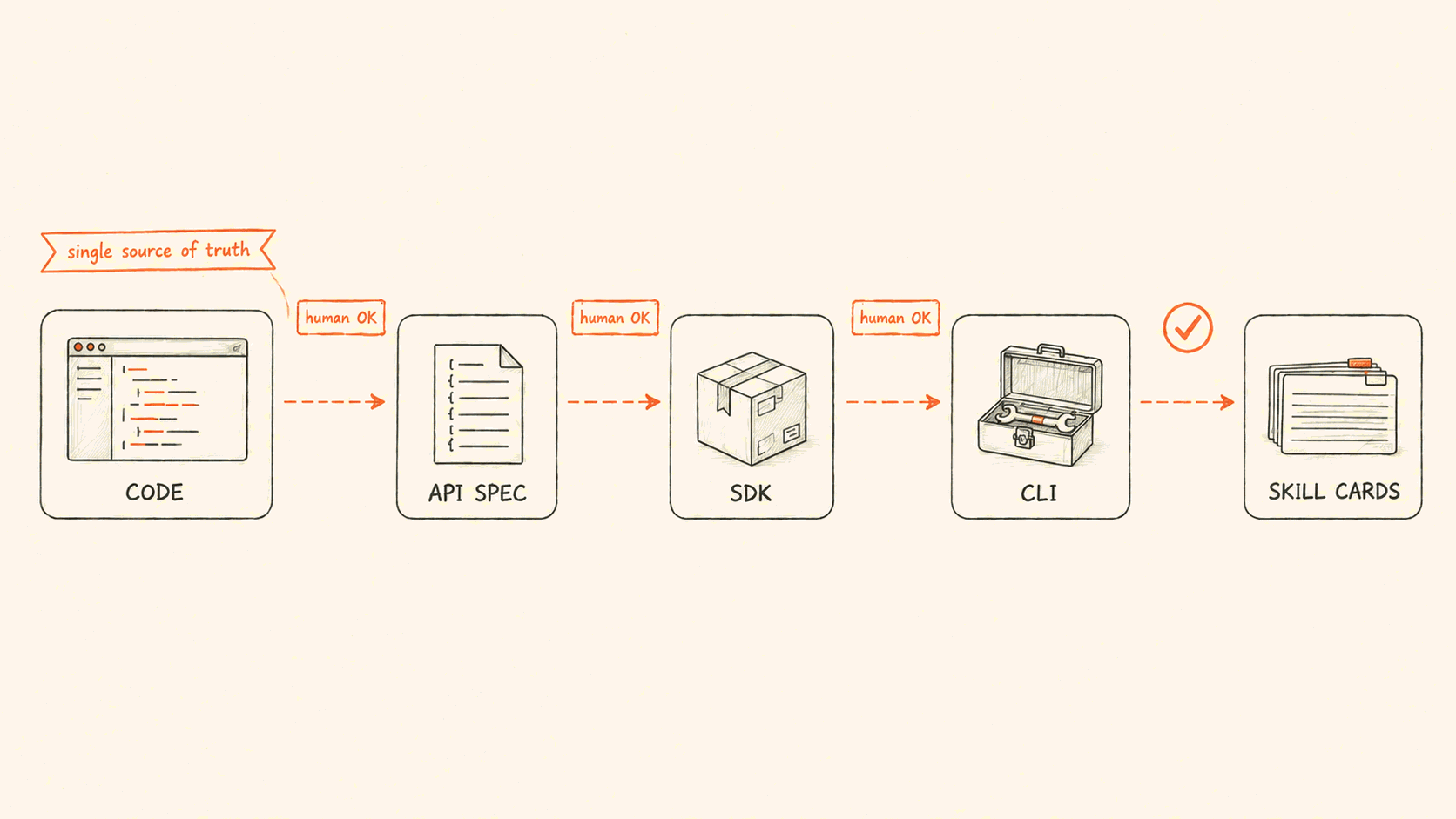
The chain isn't fully automatic. A scheduled job turns the API description into an SDK merge request, but doesn't merge it. Going from SDK to CLI takes a manual dependency bump and a generator run. An API change passes three human sign-offs before it reaches a CLI command.
Only one gate is automatic and blocks merges: the check that cards match the real command tree.
We automate only that gate because the two kinds of drift do different damage. If the CLI is missing a new API operation, that's a missing feature. The agent can't find it and says so. If a card teaches a command that doesn't exist, that's wrong information. The agent retries it, or invents a plausible command. The automatic gate blocks the second kind.
Composition lives in the skill layer, not the CLI. A full incident summary covers six aspects, which map to six separate commands. A script in the skill pack runs all six and returns the results in one block. Every section of the summary rests on real output, so the agent can't skip a command and then make up the missing part.
The CLI itself stays close to 1:1 with the API. We add only small fixes, like turning the member IDs a list API returns into names.
We reworked that script too. At first it forced all six commands into a compact, token-saving format. A production audit measured about 80,000 characters per incident. The compact format spelled out every empty field, and the agent needed three or four reads to get through it. We went back to each command's default output and added a field filter to the detail command only. Output for a model should fit in one read. Every extra page or filter is another chance to get it wrong.
Where we still use MCP
Two weeks after the switch, we moved third-party connectors to search-based loading. The agent starts with no tool descriptions loaded, only a search tool and a call tool. We chose not to use that design for our own platform.
The two choices don't conflict. We don't control third-party APIs or their releases. We can't generate a CLI, pin versions, or bundle binaries for them. Without a shell, search-based loading is the best option. The catalog now has 35 third-party connectors. About half are monitoring and observability systems.
Anthropic later published numbers that point the same way. In multi-server setups, tool descriptions used about 55k tokens. Search-based discovery cut that by more than 85%, and tool-selection accuracy went from 49% to 74%. These numbers compare search with loading everything, not search with a CLI. We haven't seen public data for the second comparison.
Our public MCP server is still running, now with 23 tools. It serves clients like Cursor and Claude Desktop that have no shell. The first screen of its README says: if your agent has a shell, use the CLI.
There's a third case where neither fits: the other side is another agent that reasons on its own. We don't call tools for that. We hand over the whole task through the Agent2Agent (A2A) protocol. For details, see how AI SRE and your agents hand work to each other.
Looking back
We made this decision on intuition. The list of costs ended up longer than we expected, and we're still working on tool selection. This setup fits our situation. Yours is different, and your answer may be too.