
A pod keeps restarting. AI SRE can read the alert, read the code, read the dashboards, and yet it cannot see what state that pod is in right now or what events it just emitted. It has to guess, or you go run kubectl yourself and paste the output back into the chat.
The goal is four things at once:
- The agent gets kubectl's full expressiveness against your cluster
- Credentials never leave the cluster
- No inbound ports are opened
- Permissions stay tight, with nothing depending on a capability list we maintain by hand
The last one is the hard one. What lives in your cluster depends on what you installed, and the long tail of CRDs is infinite, so any hand-written list is incomplete on day one. The genuinely hard part is generality and tightness at the same time: the more general the interface, the wider the surface, the harder it is to keep permissions tight.
The three off-the-shelf options
Approach one: hand it a kubeconfig and connect directly.
The first problem is safety: the credential leaves the cluster. And most production apiservers are not reachable from the internet, so either you expose it and allowlist our IP ranges, or you run the agent inside your network. In practice both proposals get rejected.
It is not simple enough either. A managed cluster's kubeconfig (EKS, GKE, AKS) contains no credential at all. It contains instructions to run a local binary that exchanges something for a token, like aws-iam-authenticator or gke-gcloud-auth-plugin. Copy that file somewhere else and it stops working. "Just send us a copy" is physically impossible on a managed cluster.
Where it does score full marks is generality: anything kubectl can do, this can do. We kept that part.
Approach two: run a Kubernetes MCP server.
The first problem is generality. MCP gives the agent a set of tools defined ahead of time, and the tool list is written by a person. A query like kubectl get pods -o jsonpath='{.items[?(@.status.phase!="Running")].metadata.name}', or some CRD specific to your cluster, is simply absent if nobody put it in the list. We have opinions about how hard a tool list is to keep complete, because our own platform capabilities moved off MCP onto a CLI for exactly this reason, and we wrote up that decision in From MCP to CLI.
The safety problem is subtler. CVE-2026-46519 in mcp-server-kubernetes, disclosed this May, is the example: its read-only switch took effect when tools were being listed but not when they were being executed, so anyone who knew a tool name could call the delete path directly. One line in the advisory is worth remembering: the bypass does not exceed the permissions Kubernetes already granted the server. Which means the thing actually stopping it was the cluster's own RBAC the whole time, not the switch.
Approach three: build our own set of Kubernetes tools.
Even a limited, read-only toolset has two problems. The first is the same as approach two: the tool list is written by people, it cannot cover every operation, and we would be permanently chasing the Kubernetes API and whatever CRDs you installed. The second is quieter: every tool schema lives in the context window, and the model has never seen these tools — how to call them and what each parameter means has to be taught in the tool description, and even taught well it will not match what the model already knows. kubectl is different: its usage is baked into the training data, and the model writes jsonpath queries better than most people. Writing a capability list turns a fluent speaker into someone who can only use a handful of memorized sentences.
These three are also more or less what vendor and community options look like today. The conclusion was clear: the interface has to keep all of kubectl's expressive power, it must not connect directly to your cluster, and the permission decision must not live on our side.
Our approach: real kubectl, no direct connection
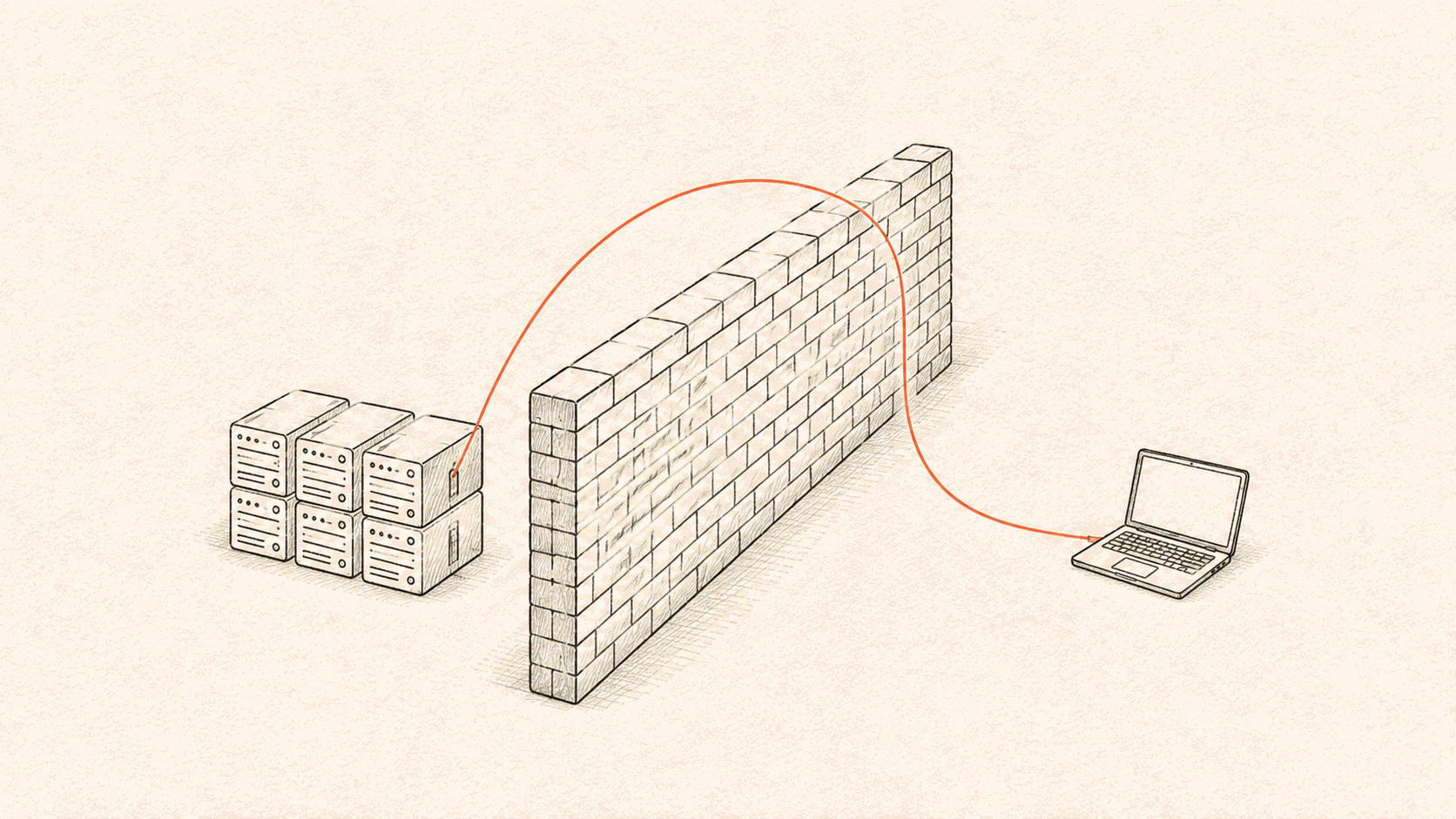
The agent runs real kubectl. There is no wrapper layer. The only thing that changes is the server address in its kubeconfig, which points at an endpoint of ours instead of your apiserver.
The agent never needs to hold a real cluster credential. It only needs kubectl to believe it holds one.
So how does a request get into your cluster? Your cluster connects out first. You install a small program in the cluster, it dials out to us on startup, and the connection stays open. Every request afterward travels back down a connection that already exists.
That collapses the whole networking question into one sentence: can your cluster reach the internet. No firewall tickets, no VPN, no bastion host, no IP allowlist.
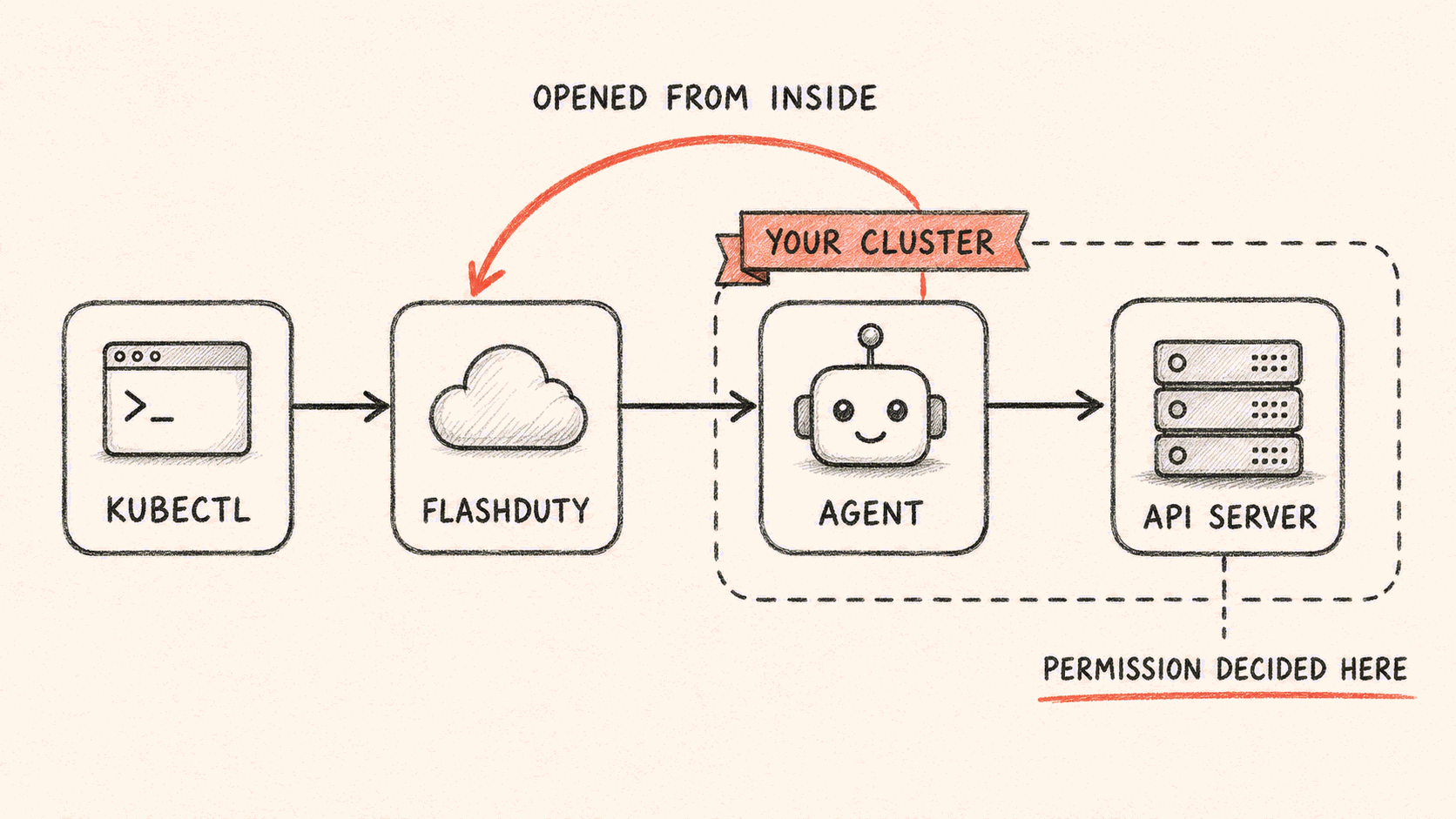
Hop by hop:
kubectl (in the session's execution environment)
  → our public endpoint /safari/k8s/proxy/<cluster>/...
  → checks: token, cluster ownership, request shape
  → back down the connection the cluster dialed out
  → the forwarder in your cluster, replaying the request verbatim
  → your apiserver, deciding with its own RBAC
Some numbers: a 60-second timeout per request, a 1 MiB request body limit, a 6 MiB response body limit, and a heartbeat every 54 seconds.
The three approaches side by side:
| Hand over a kubeconfig | Run an MCP server | Kubernetes App | |
|---|---|---|---|
| Inbound ports you open | apiserver must be reachable | depends | 0 |
| Credentials that leave the cluster | the whole kubeconfig | depends | none |
| Queries it can express | all of kubectl | whatever is in the tool list | all of kubectl |
| Long tail of CRDs | supported | wait for the tool author | passed through verbatim |
| Works on managed clusters | no | depends | yes |
| What runs in your cluster | nothing | depends | one 2.7 MB binary with no shell |
One tradeoff we have to state plainly: the connection has a request and response shape, so kubectl logs -f, exec, port-forward and watch are not supported. To follow changes, you poll.
A forwarder with nothing left in it
The program in your cluster is a pure forwarder, and we cut it down to a single static binary.
docker run --rm --entrypoint sh \
  registry.flashcat.cloud/public/flashduty-k8s-agent:v0.1.0 -c 'echo hi'

exec: "sh": executable file not found in $PATH
bash, sh, ash, dash, busybox, kubectl, curl, wget, cat, ls, env, python, perl. None of them are there. The whole image is 2.7 MB across 2 layers.
Why go that far: even if our side were fully compromised, an attacker would not find a shell to execute anything with inside your cluster. You do not have to take our word for it. The image is public, so run the command above yourself.
One kubeconfig, many clusters
Multi-cluster came almost for free. Since the agent uses native kubectl, multiple clusters are just kubectl contexts, a concept that already exists. We did not have to invent a single new word for it.
At the start of every turn we rewrite a kubeconfig into the agent's execution environment, built from the clusters this session can currently see. One context per cluster, each carrying its own server address and its own token. There is no shared credential, so the clusters are separated at the credential layer. Switching clusters is the line the agent already knows:
kubectl --context <cluster-alias> get pods -n paymentTwo design details are worth writing down.
First, we set a default context only when there is exactly one cluster. With two or more we deliberately leave it unset. The instructions injected into the model say it explicitly: do not guess the default context, run kubectl config get-contexts first, and ask when it is unclear. That structurally removes the failure where prod happened to be the default and the command landed there.
Second, the file is rewritten every single turn, including being written as an empty file when nothing is permitted. So when access is revoked, that context is gone on the next turn, with no leftovers, and a disabled cluster never gets written into the file at all.
Let Kubernetes make the permission call
We built a version with four dedicated write tools, each prompting for human confirmation before it ran. We deleted the whole thing.
The reasoning was half stated already: any decision made before the apiserver is, structurally, only advice. Kubernetes already has a complete permission system covering who, which resource, which verb, in which namespace. Layering our own on top would not make anything safer. It would add a second system to maintain and audit, and the second one would be weaker.
So permissions are now defined in exactly one place: an RBAC YAML the console generates and you apply yourself. Three levels:
- Read-only: binds Kubernetes' built-in
viewClusterRole — get, list and watch on the usual resources - Read plus limited write: adds exactly two things, scaling replicas and evicting pods
- Full access: binds the built-in
cluster-admin, genuinely unrestricted
The read-only level is worth a paragraph. It started as a hand-written resource list, and we replaced that with a direct binding to the built-in view for two reasons: the hand-written list had silently omitted configmaps, and it could never keep up with the CRD long tail. view is curated upstream and never grants secrets, and it carries an aggregationRule — CRDs whose operators mark their read roles as view-safe are included automatically, without anyone updating a list. The generated manifest comes down to this one binding:
roleRef:
  kind: ClusterRole
  name: view  # built-in read surface, no secrets; view-safe CRDs aggregate in
  # …the full three-level YAML is generated by the console; see the product docs linked below
The limited-write level holds one invariant: it may not change a pod's effective spec — not its image, command, env, identity or mounts. All it can do is change how many copies of an already-declared spec run, or evict a pod so the controller rebuilds it unchanged. The line sits there for a reason: if spec edits were allowed, the command could be changed to print a mounted credential, and the read level's pods/log would hand it back — the whole permission model would be theater. The cost is that kubectl rollout restart and rollout undo are also out, because both are PATCHes on the workload and no authorization layer can tell a genuine rollback from a template swap. Restart has a substitute — evict pods one at a time. Rollback has none; it gets proposed to a human instead.
You read this YAML and you install it. The boundary is something you can verify with your own eyes instead of taking our description on trust.
RBAC alone is not enough, though, because RBAC only sees verb and resource. It cannot see what an endpoint actually does. The security team at Horizon3 published an example: an account holding nothing but read on nodes/proxy looks purely read-only on paper, yet can go from that read-only boundary to arbitrary command execution through the kubelet, because the connection is established with a GET and the permission system therefore sees a read. Upstream marked it as won't fix.
So we do add one check on our side, but it constrains the shape of the request rather than the permission: the path is split on /, any segment equal to exec, attach or portforward is rejected outright, and so is anything carrying watch=true or follow=true.
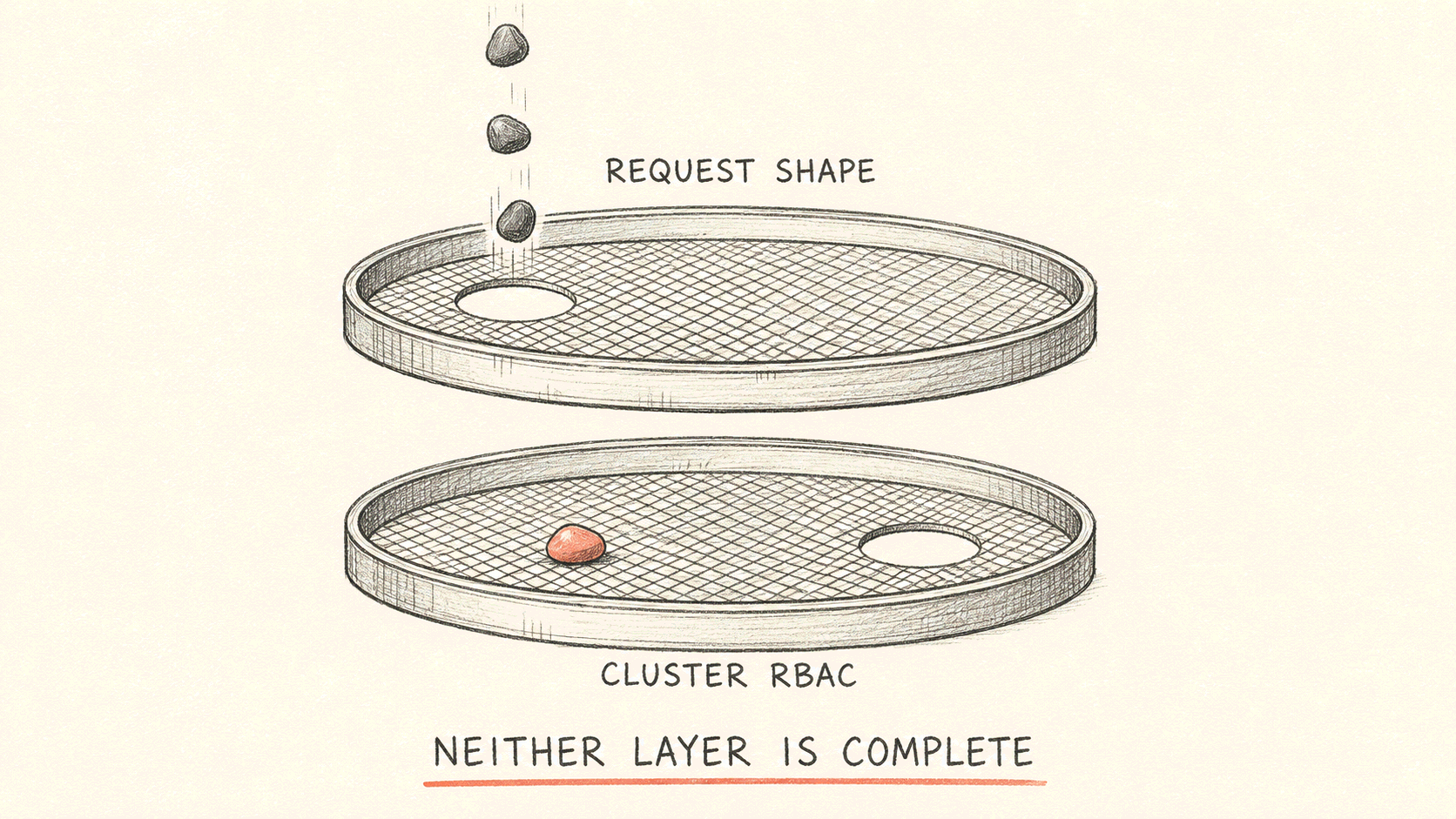
What each layer does and does not cover:
| Catches | Misses | What covers the gap | |
|---|---|---|---|
| Our request-shape narrowing | paths containing exec, attach or portforward, including the kubelet route .../proxy/exec/... | the kubelet's other execution entry points (.../proxy/run/..., for instance) are not on the list | we never grant nodes/proxy at all, so the apiserver rejects it |
| Your cluster's RBAC | neither read-only nor read plus limited write contains nodes/proxy | "all namespaces plus full access" is unrestricted and does contain it | only the red warning in the console — on this row, human judgment is the backstop |
So we do not tell you what the agent cannot touch. We tell you how bad it can get if something goes wrong. No layer here is complete. What you get is the overlap between two of them.
The install step is yours to run
The console could install everything for you, as long as you gave us a cluster credential. That is approach one, which we already rejected.
So we went the other way: the console generates a command and you run it against your cluster. It is one extra step, and what you get back is the ability to read everything that is about to enter your cluster before you apply it.
Since this command runs on somebody else's production cluster, we made it fairly paranoid.
The entire script body is wrapped in main() { ... }. The reason is in the code comment: if the download is ever truncated or the file is tampered with, it fails at the syntax check instead of executing half a script.
Permissions are checked one by one before anything is touched. kubectl auth can-i runs eight checks, list and delete on each of roles, rolebindings, clusterroles and clusterrolebindings. Anything missing is listed, then it exits, printing No cluster resources were changed.
Passing the preflight still does not install anything. It first runs kubectl apply --dry-run=server so your own apiserver validates the manifest, and only then installs for real.
Uninstall is symmetric: it deletes by an exact ownership label, so it only removes what this App installed. The code explicitly forbids the looser "label exists" selector, with a comment explaining why, because that form would match every App installed in the cluster. The shared namespace is left alone too, since another App may still be using it.
The install and uninstall command links expire after 10 minutes.
In the console, the Kubernetes App sits in the same catalog as the GitHub and GitLab Apps, but it connects in a different way. Those two run an authorization flow and exchange it for credentials, which we covered in how AI SRE reads your repositories. This one has your cluster dial out.
What you get, and the limits
What ships: kubectl's full query capability, zero inbound ports, no credentials leaving the cluster, and a permission boundary that is a YAML you read and apply yourself.
The limits, stated plainly:
- No streaming operations.
logs -f,exec,port-forwardandwatchare unsupported; following changes means polling. - The read-only level reads the built-in
viewsurface: the usual resources are in,secretsnever are. Whether a CRD is readable depends on its operator — if it marks its read roles view-safe the CRD is included automatically; if not, reading it takes the full-access level. - The limited-write level cannot touch a pod's spec — no image, command or env changes, only replica counts and pod evictions. As a result
rollout restartandrollout undoare unavailable too; restarts go through one-by-one evictions, and rollbacks get proposed to a human. - "All namespaces plus full access" is genuinely uncapped. The red warning in the console means it.
- Revoking severs the connection; what is already installed in the cluster does not uninstall itself.
The feature itself is described in this changelog entry, and the configuration steps are in the product documentation. If you want to try it, create a Kubernetes App under AI SRE plugins in the console, start with read-only on a single namespace, and see what it can find.