
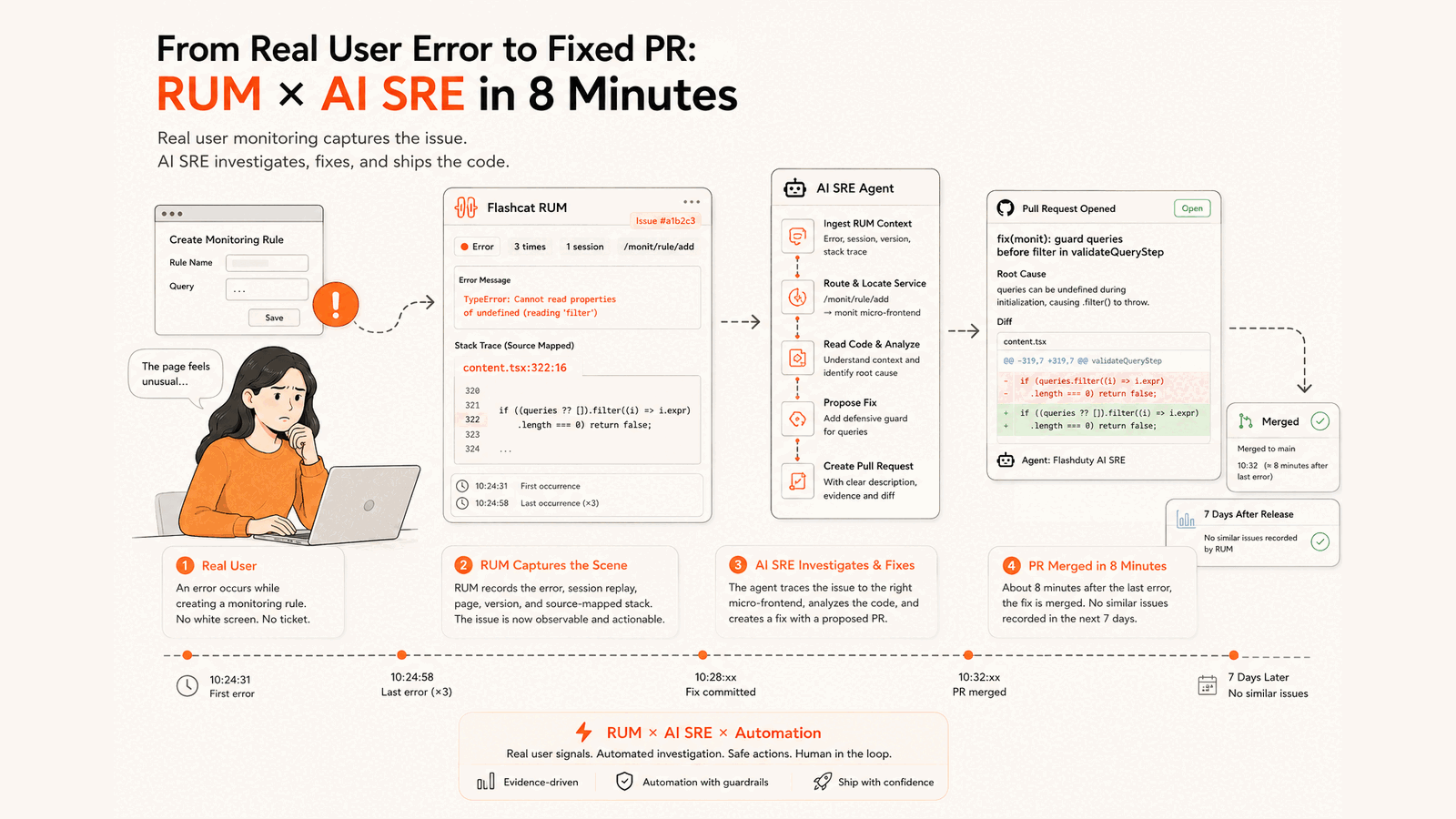
On July 15, the monitoring-rule creation page in our own console threw the same exception three times for one user. Eight minutes after the last error, the team merged a one-line fix written by AI SRE into the main branch. Here's how RUM kept the evidence, how AI SRE found the right repository, and a second case where it correctly left the code alone.
The exception:
TypeError: Cannot read properties of undefined (reading 'filter')All three errors came within half a minute. Users rarely file a ticket for a glitch like this, and nobody can reproduce "something felt off." But the RUM (Real User Monitoring) SDK in the page had recorded it. RUM tracks what real users run into, not what a test environment shows. It linked the error to the page, release, device, and the pages the user visited, and grouped the samples into an Issue.
The Issue showed the error was concentrated on the monitoring-rule creation page. This sample affected one session, occurred three times, and came from a single production release. The session timeline kept the page views leading up to the failure.
SourceMap pointed back to the source line
Frontend code is bundled and minified before it ships. Without a SourceMap, a browser stack points at something like index-q2_vQxih.js:134:36624, and an engineer still has to work out which file and function that is.
A SourceMap maps the minified output back to the original files. When you upload the SourceMap that matches the deployed release, RUM can restore the stack to the original file, function, and line.
For this Issue, RUM restored the top frame to:
src/Packages/monit/pages/rule/add/content.tsx:322:16The calling frame restored to content.tsx:287:12. Expanding the stack showed the exact line:
if (queries.filter((i) => i.expr).length === 0) return false;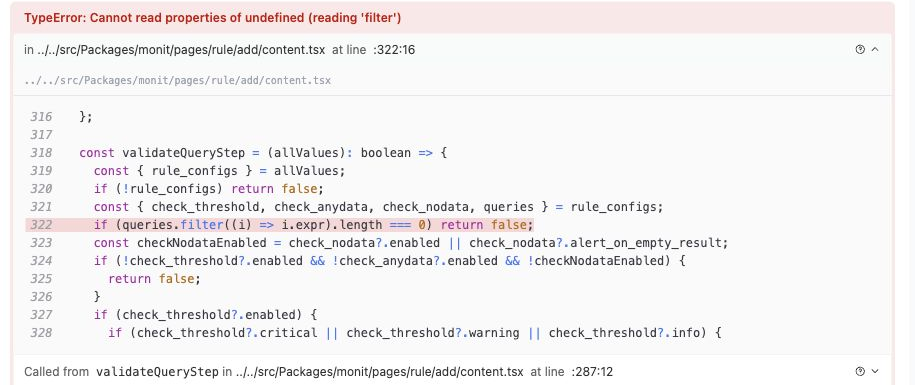
The screenshot is cropped to remove Issue, application, user, and session identifiers.
Now an engineer could see that validateQueryStep called .filter() on queries while validating the alert query.
That still didn't say why. Why was queries undefined? Which repository owned the file? Should the fix go in the frontend shell or in the monitoring micro frontend?
The automation handed the evidence to AI SRE
In our setup, a RUM Issue enters the Flashduty incident flow and triggers an automation. It's one of three ways an automation can start; this one uses the incident trigger.
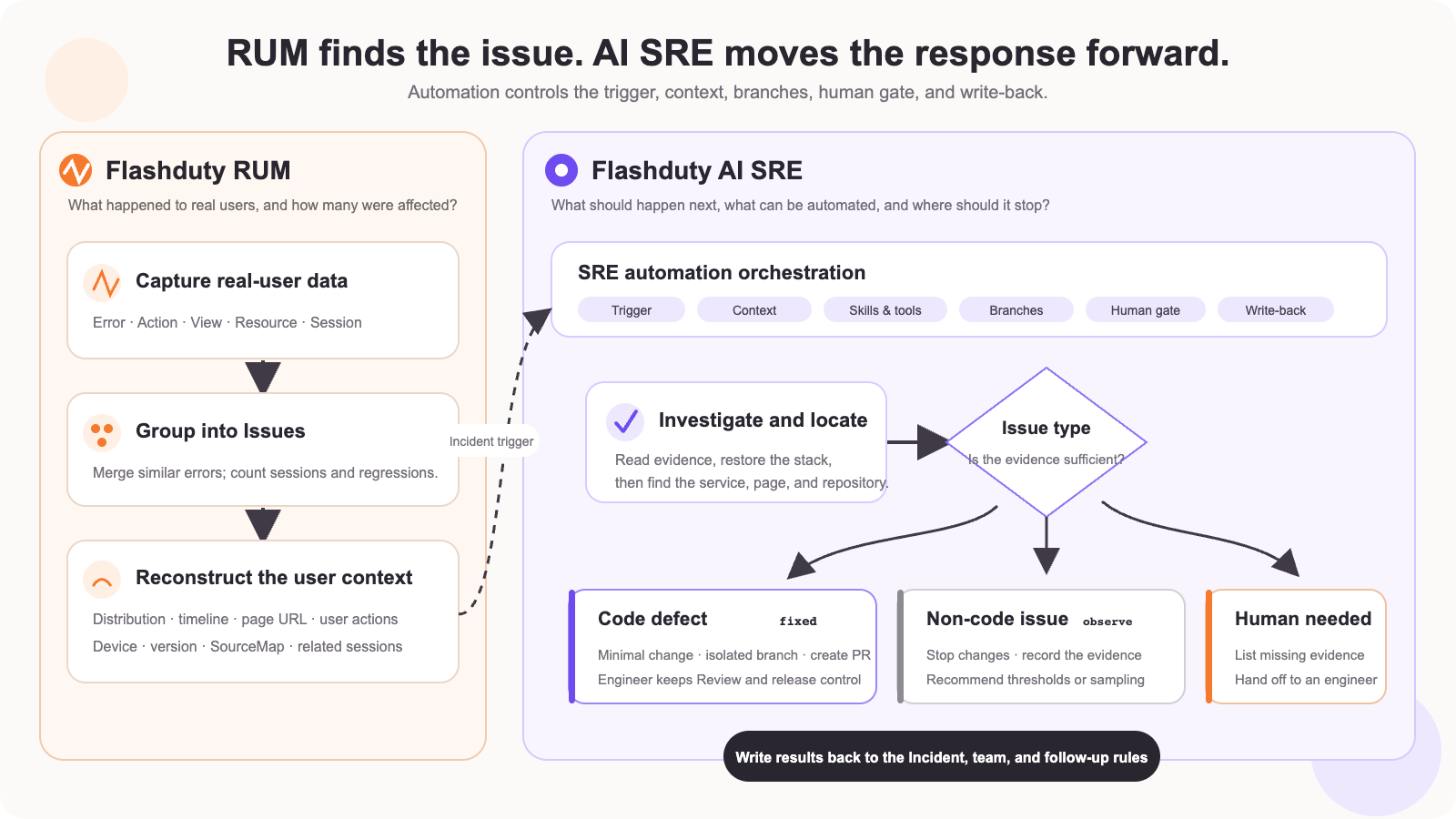
The automation sets the trigger, injects the RUM context, chooses the investigation steps and tools, and limits how far AI SRE may act.
So AI SRE didn't get one error string. It got the evidence set: error type, occurrence count, page URL, release version, session distribution, and the SourceMap stack.
One snag. The application mapping first pointed to the frontend shell, foundation-app. But the failing page lived at /monit/rule/add. AI SRE combined the route with the restored source path, followed it into the monitoring micro frontend, and found the repository that owned the code. It didn't search blindly inside the shell.
That step is important in large frontends. When a shell hosts several micro frontends, knowing which application raised the error isn't enough. You need the route, the SourceMap path, and the repository mapping together.
The root cause was in form initialization
The SourceMap context looked roughly like this:
const { rule_configs } = allValues;
if (!rule_configs) return false;

const {
  check_threshold,
  check_anydata,
  check_nodata,
  queries,
} = rule_configs;

if (queries.filter((i) => i.expr).length === 0) return false;
The code checked that rule_configs existed, but assumed queries was always an array. During the first form validation, rule_configs already existed but the query list wasn't initialized yet. So queries could be undefined.
That's why the error repeated in one visit: every validation pass hit the same line.
The fix needed no API change and no form rewrite. "No query configured yet" just had to fail validation without throwing:
- if (queries.filter((i) => i.expr).length === 0) return false;
+ if ((queries ?? []).filter((i) => i.expr).length === 0) return false;
One line. When queries exists, behavior is unchanged. Before it initializes, the empty array makes validation return false instead of throwing.
Eight minutes after the last error, the fix was on main
The Issue left a clear timeline:
- RUM recorded the last error sample.
- About four minutes later, the fix for
queries.filter(...)was committed. - About eight minutes after the last sample, the team merged the fix PR into main.
The PR described the production error, the service and release, the SourceMap line, the root cause, and the one-line diff. It was marked as Agent-generated.
Automated remediation doesn't mean AI skips the engineering process and deploys. AI SRE can read evidence, change code, and open a PR. The team still decides whether to merge and when to release. Here, an engineer reviewed and merged the fix. The last RUM sample came just before the merge, and no new sample of that error appeared in the next seven days.
A week later we replayed the same Issue through AI SRE. It read the RUM evidence, followed the route and SourceMap into the monitoring micro frontend, and saw the guard was already on main. It didn't open a duplicate change. In SRE work, avoiding a redundant fix counts as much as catching a missed one.
Not every Issue should reach the repo
Another Issue, fetchError · Network request failed, triggered the same automation. It hit one mobile session, once. There was no cluster of similar errors and not enough page or stack evidence.
AI SRE didn't change code just to finish the task. It recorded its assessment and what evidence was missing: watch this signature, and reopen the investigation if it repeats or spreads to more sessions.
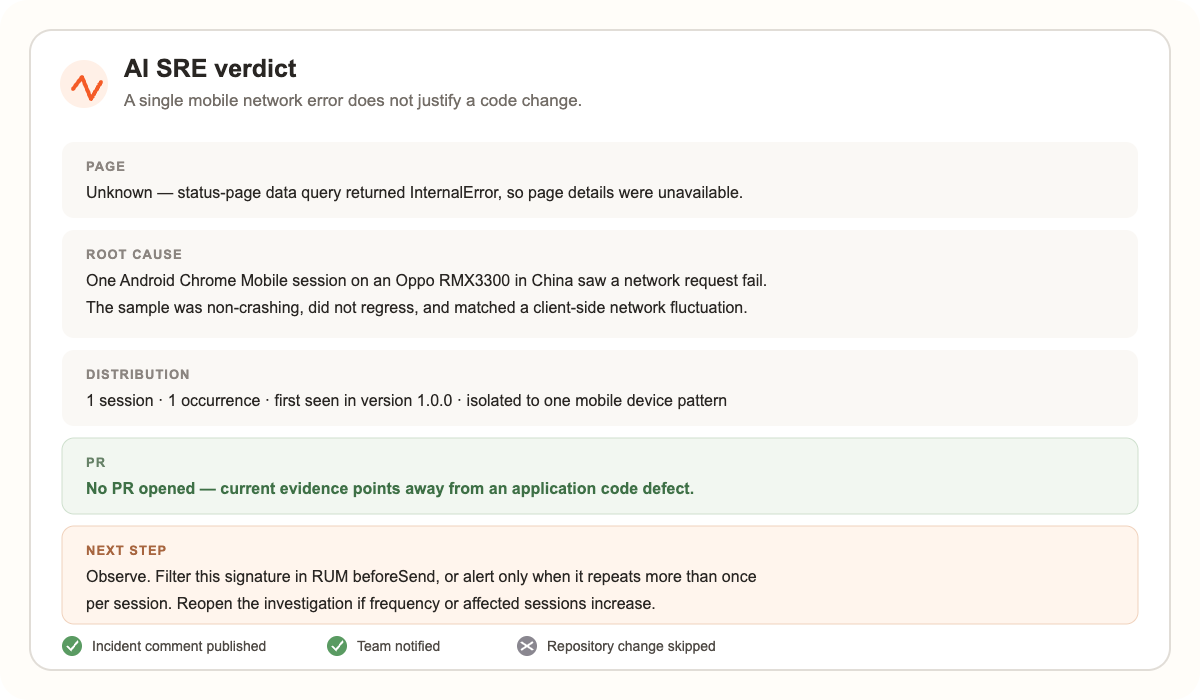
The two Issues together show what the automation is for. When evidence points to a code defect and the change is small and clear, the investigation can go all the way to a PR. When evidence is thin or the problem looks environmental, the right move is to stop, not to produce a code change nobody is sure of.
How the pieces fit
RUM supplies real-user evidence. The automation decides which Issues trigger, what context goes in, which tools are available, whether a PR may be opened, and where a human must confirm. AI SRE investigates and acts within those limits. Engineers keep review, merge, and release authority, and RUM keeps watching the new release for the same error.
Running this with your own app
Start RUM on one important frontend app. Collect errors with release, environment, page, and session context, and upload the matching SourceMap with every release. Once an Issue can tell you what failed, on which page, in which release, and at which source line, RUM is already saving you investigation time.
Next, map apps and pages to their repositories. Give AI SRE scoped access to read RUM evidence, read source, and open a PR. How that access is issued and scoped is in GitHub and GitLab Apps for AI SRE. For a first replay, pick an older Issue that recurred several times and whose SourceMap already points at business code.
A useful replay doesn't have to end in a PR. It may find the evidence is too thin, the bug is already fixed, or you should keep watching. What you want is evidence behind every decision, a clear limit on code changes, and engineers in control of merge and release.